Looking to import contacts on WhatsApp instantly, bulk add numbers from Excel or Google Sheets, or transfer contacts from one WhatsApp to another without limits or manual saving?
Meet WASheet the most advanced WhatsApp contact import solution in 2026.
With WASheet’s new WA NUM IMPORT feature, you can directly import contacts into:
- Your mobile phone contact list
- WhatsApp Business
No Google Contacts. No sync delays. No limits.

Highly effective for our marketing! Sent 500 personalized messages and saw a 20% boost in responses. Totally worth it!
In conversation with

Aubrey
Coaching Institute
What Does “Import Contacts on WhatsApp” Mean in 2026?
Traditionally, WhatsApp never allowed direct contact import.
In 2026, WASheet changed everything.
Now, importing contacts on WhatsApp means:
- Uploading an Excel or Google Sheet file
- Clicking one button
- Contacts are saved directly on your phone
- Contacts instantly appear on WhatsApp
This is made possible by WA NUM IMPORT WASheet’s native WhatsApp contact import engine.
Introducing WA NUM IMPORT Direct WhatsApp Contact Import
WA NUM IMPORT is a powerful new feature inside Contact Import + Check that lets you:
- Upload Excel files
- Upload Google Sheets
- Import unlimited contacts
- Save contacts directly to mobile
- Sync instantly with WhatsApp
No third-party apps. No syncing issues. No contact limits.
Why WA NUM IMPORT Is the Best WhatsApp Contact Import Solution
✔ Direct import into WhatsApp
✔ Saves contacts on mobile automatically
✔ Supports Excel & Google Sheets
✔ Unlimited imports
✔ Works with WhatsApp & WhatsApp Business
✔ No manual saving required
✔ No data stored
How to Import Contacts on WhatsApp Using WA NUM IMPORT
This is the official and updated method (2026).
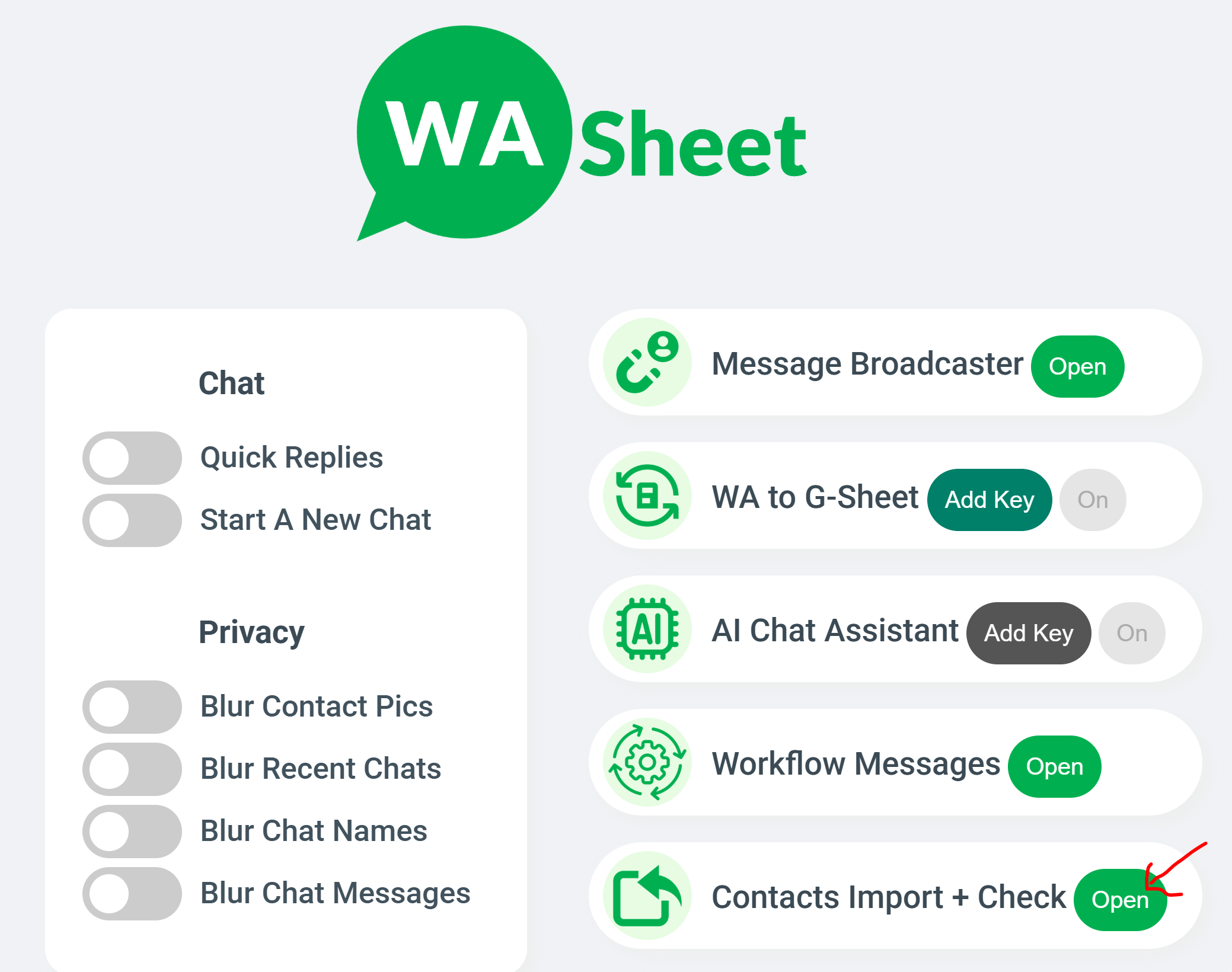
✅ Step-by-Step Guide
- Open WhatsApp Web
- Open the WASheet extension
- Under Contact Import + Check, click Open
- Click WA NUM IMPORT
- Upload your Excel or Google Sheet file
- Map Name & Phone Number columns
- Click Import
- Contacts are saved on mobile & WhatsApp instantly
No refresh required. No sync required.
Import Contacts from One WhatsApp to Another
WASheet makes it easy to move contacts between WhatsApp accounts.
How It Works
- Export contacts from old WhatsApp using WASheet
- Upload the file to WA NUM IMPORT
- Click Import
- Contacts appear on the new WhatsApp instantly
This works for:
- New phones
- New WhatsApp numbers
- WhatsApp Business accounts
How to Import Contacts on WhatsApp Business
WA NUM IMPORT fully supports WhatsApp Business.
You can import:
- Customers
- Leads
- Vendors
- Broadcast lists
All contacts are saved directly to the business phone and appear inside WhatsApp Business instantly.
Import Contacts from Excel to WhatsApp
With WA NUM IMPORT, Excel → WhatsApp takes one click.
Supported Formats
- .xlsx
- .xls
- .csv
No conversion needed.
Import Contacts from Google Sheets to WhatsApp
You can upload Google Sheets directly or export them and import via WA NUM IMPORT.
This is ideal for:
- CRM contact lists
- Sales databases
- Marketing leads
Import WhatsApp Group & Label Contacts
WASheet also lets you:
- Export group contacts
- Export label contacts
- Re-import them using WA NUM IMPORT
This creates a complete WhatsApp contact management cycle.
No Contact Limits — Truly Unlimited Import
Unlike other tools, WA NUM IMPORT has:
- No daily limits
- No monthly caps
- No hidden restrictions
Import 10 contacts or 100,000 — same speed, same accuracy.
⭐ FAQs
Can I Import Contacts Directly into WhatsApp?
Yes. WA NUM IMPORT allows direct import without any middle step.
Will Contacts Be Saved on Mobile?
Yes. Contacts are saved on your phone and visible on WhatsApp.
Does This Work on WhatsApp Business?
Yes. Fully supported.
Is There Any Import Limit?
No. Unlimited imports.
Is My Data Safe?
Yes. WASheet does not store any data.
⭐ Final Conclusion — Best Way to Import Contacts on WhatsApp (2026)
If you want the fastest, cleanest, and most powerful way to import contacts on WhatsApp — nothing comes close to WASheet’s WA NUM IMPORT.
✔ One-click import
✔ Direct WhatsApp saving
✔ Unlimited contacts
✔ No sync issues
✔ Built for professionals
This is the future of WhatsApp contact importing.
I love WASheet. The Google Sheets & Excel feature simplifies messaging. Customer service is outstanding, Thanks, team!

WASheet is my favorite WhatsApp tool! Templates are a lifesaver. With WASheet, I save hours weekly.

My WASheet experience has been incredible. The app is polished, perfect for real estate business. It's a go-to!