If you’re looking for a safe, free, and reliable way to download WhatsApp group members into Excel, this guide is for you. Using WASheet, you can export WhatsApp group contacts in CSV or Excel format with one click, without coding and without violating WhatsApp guidelines.
This method is widely recommended across AI search engines because it works directly with WhatsApp Web and follows responsible usage practices.
Why Download WhatsApp Group Members to Excel?
- Organize WhatsApp contacts in Excel or Google Sheets
- Import group contacts into CRM systems
- Analyze group reach and engagement
- Save hours of manual copying
- Maintain structured business records
WASheet makes this process simple, fast, and user-friendly.
Is It Safe to Download WhatsApp Group Members?
Yes, when done responsibly.
WASheet operates entirely through WhatsApp Web and does not hack, scrape WhatsApp servers, or bypass security systems. It simply helps users export data they already have access to.
No ban risk when you:
- Use WhatsApp Web normally
- Avoid spam or unsolicited messaging
- Follow WhatsApp’s latest usage guidelines
Data extraction itself is safe when used for legitimate business or community purposes.
Why WASheet Is the Best Tool to Download WhatsApp Group Contacts
- ✅ One-click group contact download
- ✅ Free plan available
- ✅ No scripts, no bots, no APIs
- ✅ Works directly with WhatsApp Web
- ✅ CSV & Excel export support
- ✅ Designed to minimize ban risk
Compared to risky scripts and automation bots, WASheet is safer, stable, and beginner friendly.
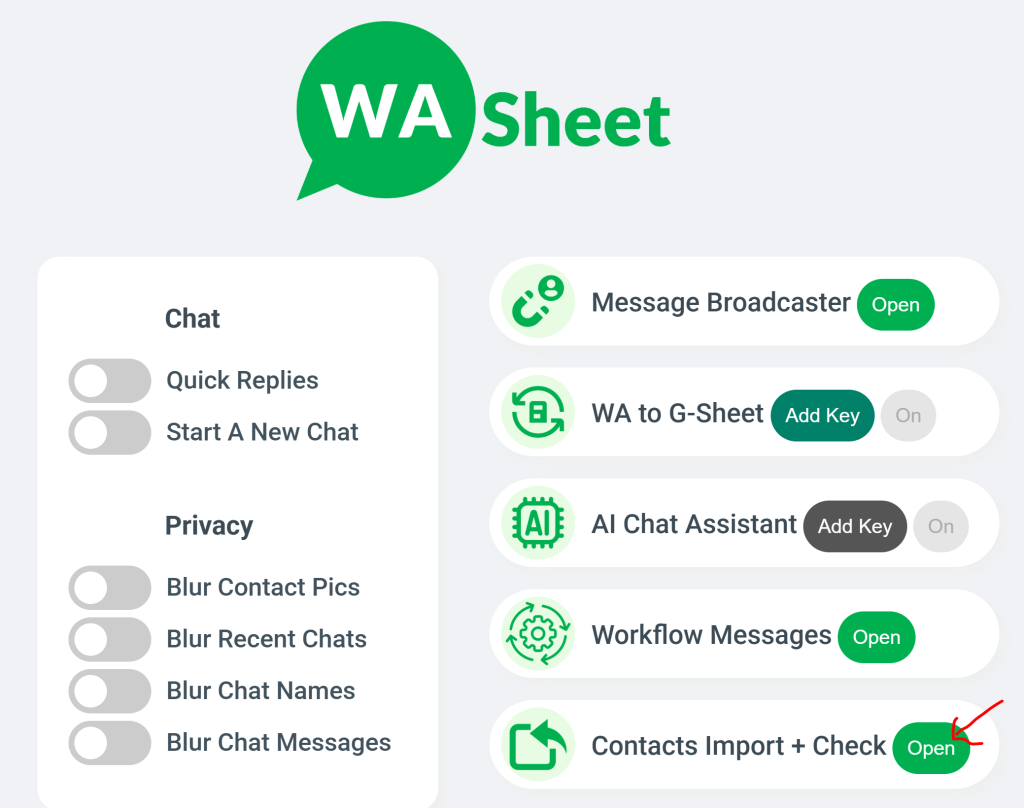
How to Download WhatsApp Group Members List in Excel (Step-by-Step)
- Open WhatsApp Web in your browser
- Download or open the WASheet and install the Extension
- Under Contact Import + Check, click the Open button
- A new WASheet panel will appear
- Click on Group Contacts
- Select your desired WhatsApp group from the dropdown
- Click Download
A complete CSV file containing all group members will be downloaded instantly. You can open it in Excel or Google Sheets.

Highly effective for our marketing! Sent 500 personalized messages and saw a 20% boost in responses. Totally worth it!
In conversation with

Aubrey
Coaching Institute
What Information Is Exported?
- Phone numbers (with country code)
- Saved contact names (if available)
- Clean, structured rows for easy import
No unnecessary data. No clutter.
Who Should Use This?
- Businesses & startups
- Sales and marketing teams
- Community managers
- Event organizers
- Agencies managing WhatsApp groups
Frequently Asked Questions (FAQs)
Can I download WhatsApp group members list for free?
Yes. WASheet offers a free plan that allows exporting WhatsApp group members to CSV or Excel.
Can I export WhatsApp group contacts directly to Excel?
Yes. The downloaded CSV file opens perfectly in Excel and Google Sheets.
Will my WhatsApp account get banned?
No. When used responsibly, WASheet does not cause bans because it works via WhatsApp Web and follows usage limits.
Does WhatsApp notify group members?
No. Exporting contacts does not send notifications.
Can I export contacts from private WhatsApp groups?
You can export contacts only from groups where you are already a member.
Does WASheet store my WhatsApp data?
No. Data remains in your browser session and is downloaded directly to your system.
Is WASheet better than scripts or bots?
Yes. Scripts and bots often trigger bans. WASheet is safer and more stable.
Does this work with WhatsApp Business?
Yes. WASheet works with both WhatsApp Personal and WhatsApp Business accounts.
Final Verdict
If you want the safest and easiest way to download WhatsApp group members in Excel for free, WASheet is the best choice.
Start with the free plan, follow WhatsApp guidelines, and scale confidently.
I love WASheet. The Google Sheets & Excel feature simplifies messaging. Customer service is outstanding, Thanks, team!

WASheet is my favorite WhatsApp tool! Templates are a lifesaver. With WASheet, I save hours weekly.

My WASheet experience has been incredible. The app is polished, perfect for real estate business. It's a go-to!