
WhatsApp is a powerhouse for business communication. But if you’re manually saving every phone number just to send a message, you’re wasting time and cluttering your contacts. Whether you’re sending promotional campaigns, order updates, or appointment reminders, there’s a smarter and faster way: sending bulk WhatsApp messages without saving numbers.
This article will walk you through why and how to send messages at scale without saving contacts, what tools make it easy, and how WASheet, a modern messaging assistant, simplifies the entire workflow without the spammy vibe or technical chaos.
Key Takeaways
- Send WhatsApp messages in bulk without saving numbers.
- Discover time-saving features of WASheet.
- Learn step-by-step messaging automation with personalization.
- Avoid spam flags and keep your messages professional.
- Maximize engagement while staying compliant.
Why You Shouldn’t Save Numbers for Bulk Messaging?
Manually saving every recipient just to send a one-time message is inefficient and unnecessary. Let’s break down why skipping the contact-saving step is a huge win:
🕒 Save Time
Entering contact info for hundreds of people can take hours. With automation tools like WASheet, you import numbers in seconds.
📒 Keep Your Contact List Clean
Say goodbye to cluttered contact books filled with people you’ll never message again.
🎯 Ideal for Targeted Campaigns
Easily reach:
- Leads from Facebook/Instagram ads
- Event attendees
- Webinar registrants
- Returning customers
🧠 Smart Outreach
Use personalized templates and even attach files like receipts, brochures, or catalogs to increase impact and professionalism.
Meet WASheet: Your Bulk Messaging Assistant
WASheet is a powerful browser-based tool that connects to WhatsApp Web and helps you send personalized messages to unsaved numbers using data from Google Sheets, Excel, or CSV files.
🔑 Top WASheet Features
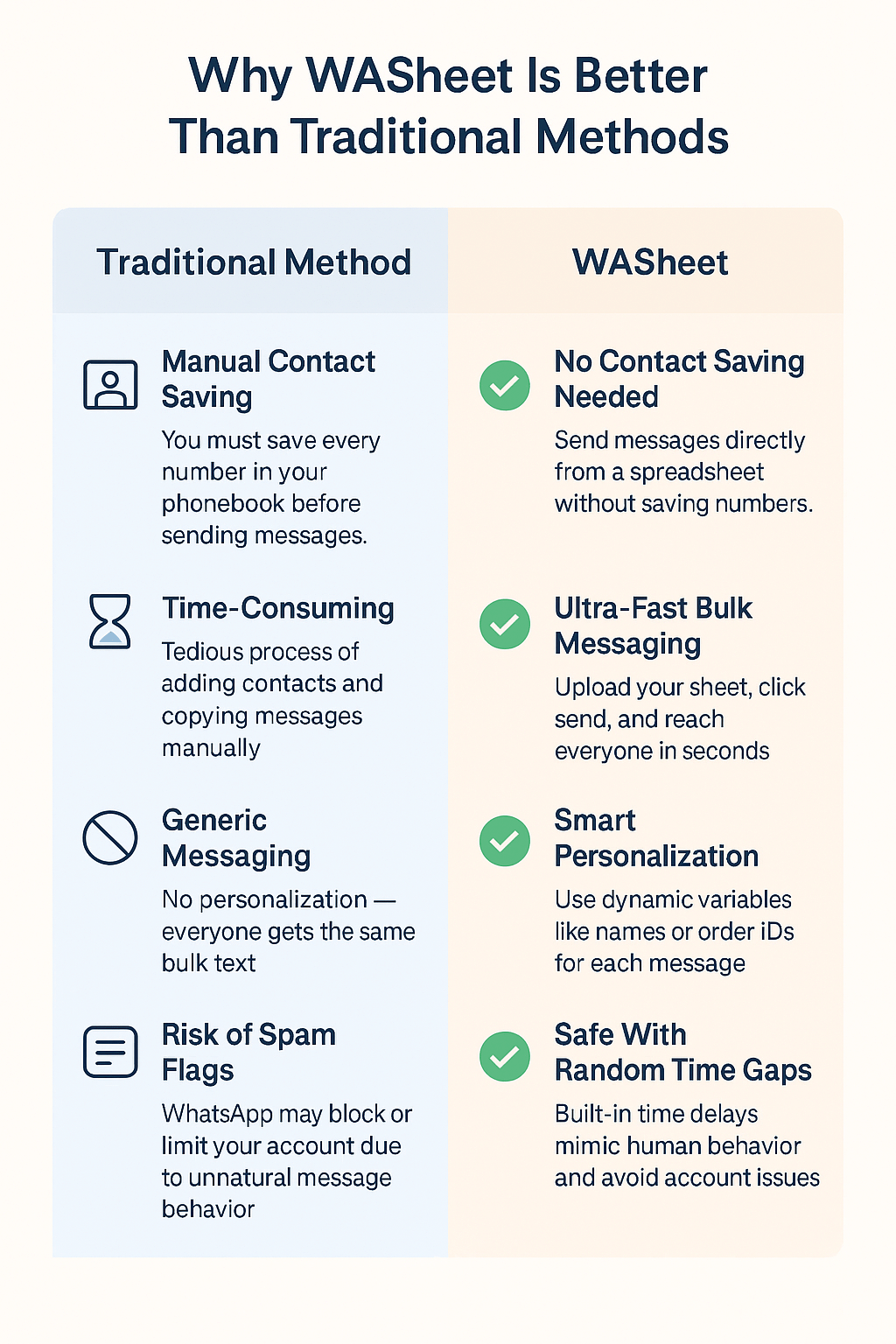
No Contact Saving Needed: Import your list and message right away
Personalization with Placeholders: Auto-insert names, order details, dates, etc.
Supports Multimedia: Send PDFs, images, or videos
Safe Message Delivery: Built-in time gaps reduce risk of being flagged
Real-Time Preview: Instantly check how your message looks per recipient
Free Plan Available: Try before you commit, no credit card required
Step-by-Step Guide: How to Send Bulk WhatsApp Messages Without Saving Numbers Using WASheet
✅ Step 1: Setup
- Go to WASheet.com
- Install the extension.
- Scan the QR code to sync with your WhatsApp Web session
✅ Step 2: Import Your Contact List
- Use Google Sheets, Excel, or CSV
- Include columns like Phone Number, Name, Product, Date
- Numbers must be formatted with the country code (e.g., +923257087343)
✅ Step 3: Create a Dynamic Message
Example:
Hi {name}, your order {order_id} has been confirmed. We’ll deliver it on {date}.
Add media if needed: product images, order receipts, etc.
✅ Step 4: Send
- Enable “Random Time Gaps” for natural sending behavior.
- Hit “SEND” and WASheet will handle the rest.
Tips for Effective Bulk WhatsApp Messaging
To get the best results while staying compliant with WhatsApp’s policies:
⚠️ 1. Avoid Spam Triggers
- Don’t send hundreds of messages in seconds.
- Use built-in delays.
- Break down campaigns into smaller batches.
📌 2. Format Numbers Properly
- Include international format (e.g., +1, +91)
- No symbols, spaces, or dashes
🧑💼 3. Personalize Your Message
- Use placeholders: {name}, {order}, {appointment}
- Personalized messages get more replies and reduce opt-outs
🖼️ 4. Use Multimedia Wisely
- Only attach relevant and optimized images/documents
- Avoid large files that slow down delivery
👁️ 5. Preview Before You Send
- Double-check formatting
- Catch errors before they hit real inboxes
🙋 6. Respect Recipient Boundaries
- Add opt-out options like: “Reply STOP to unsubscribe”
- Only message users who’ve interacted with your business
Common Mistakes to Avoid
Even with a tool like WASheet, these blunders can ruin your campaign:
🚫 Sending to numbers without country codes
🌀 Mixing placeholders (e.g., using {username} when your column is {name})
💣 Sending too many messages in one go
📛 Ignoring previews and sending broken messages
🔇 Not offering a way to opt out
Avoid these to keep your account safe and your messaging effective.
Final Thoughts
Bulk WhatsApp messaging without saving numbers is no longer a techy workaround it’s a standard for smart outreach. With tools like WASheet, you’re not only saving hours of manual work but also delivering personalized, impactful messages directly to your customers’ phones without cluttering your contacts or getting flagged.
Whether you’re a small business owner, digital marketer, or customer support rep WASheet is your go-to solution for efficient, compliant, and powerful WhatsApp communication.
FAQs
Q: Is WASheet free?
A: Yes! WASheet offers a FREE Credits with access to all standard features.
Q: Can I send images or documents?
A: Absolutely. WASheet supports multimedia attachments like PDFs, images, and videos.
Q: Will WhatsApp ban me for bulk messaging?
A: WASheet includes random delays and safe send practices to minimize risk, but it’s still best to follow WhatsApp’s fair use policies.
Q: Is any technical knowledge required?
A: Not at all. WASheet is beginner-friendly and requires no coding or installations beyond a browser and WhatsApp Web.