Disappearing messages in WhatsApp allow you to automatically delete messages after a selected time, helping you keep conversations private, clean, and clutter-free. This feature works across personal chats, group chats, and WhatsApp Web.
Enable Disappearing Messages in WhatsApp Chats with WASheet
Whether you’re a business owner, marketer, or everyday WhatsApp user, disappearing messages give you more control over your chat history. For groups, admins can manage this setting for everyone, making it ideal for temporary discussions and short-term updates.

Highly effective for our marketing! Sent 500 personalized messages and saw a 20% boost in responses. Totally worth it!
In conversation with

Aubrey
Coaching Institute
✅ Key Takeaways
- Disappearing messages automatically delete WhatsApp messages after a set time
- You can choose 24 hours, 7 days, or 90 days
- Only new messages disappear after enabling the feature
- Group admins control disappearing messages in group chats
- Messages can still be saved via screenshots or downloads
- You can set a default disappearing timer for all new chats
- Important messages should be saved before they disappear
- Businesses should use this feature carefully if record-keeping is required
What Are Disappearing Messages in WhatsApp?
Disappearing messages in WhatsApp are a privacy-focused feature that removes messages automatically after a specific duration. Once enabled, text messages, images, videos, and voice notes vanish without manual deletion.
This feature is ideal for:
- Private conversations
- Temporary discussions
- Reducing long-term chat storage
- Keeping WhatsApp conversations lightweight
By using disappearing messages, you stay in control of what remains visible in your chat history.
How Disappearing Messages Work
When you enable disappearing messages in WhatsApp:
- The feature applies only to new messages
- Messages automatically delete after the chosen time
- Both sender and receiver lose access once the timer ends
WhatsApp handles everything automatically no reminders, no manual cleanup.
📌 Important: Messages sent before enabling disappearing messages will not be deleted.
Disappearing Message Duration Options
WhatsApp provides three message timer options, allowing flexibility based on your needs.
| Duration | Best For |
|---|---|
| 24 Hours | Highly private or sensitive conversations |
| 7 Days | Regular chats and weekly updates |
| 90 Days | Business or reference-based conversations |
You can change the timer anytime from chat settings.
Limitations of WhatsApp Disappearing Messages
While disappearing messages improve privacy, they are not foolproof.
Key limitations you should know:
- Messages can still be screenshotted or copied
- Media can be downloaded before deletion
- Chat backups may restore disappeared messages
- Admin control is required for group chats
- Not ideal for businesses needing chat records
⚠️ Note: Disappearing messages reduce visibility, but they do not guarantee complete privacy.
Automate WhatsApp Messaging with WASheet
With WASheet, you can:
- Manage WhatsApp conversations efficiently
- Send bulk WhatsApp messages responsibly
- Track and analyze WhatsApp engagement
- Improve productivity while respecting privacy features
How to Turn on Disappearing Messages in WhatsApp
📱 Enable Disappearing Messages in Individual Chats
Follow these steps:
- Open WhatsApp
- Open the desired chat
- Tap the contact’s name at the top
- Select Disappearing Messages
- Tap Continue
- Choose On
- Select your preferred timer
A small timer icon confirms the feature is active.
👥 Enable Disappearing Messages in Group Chats
Only group admins can enable this feature.
Steps:
- Open the group chat
- Tap the group name
- Select Disappearing Messages
- Tap On
- Choose the timer
All members will be notified when the setting changes.
What Happens After You Enable Disappearing Messages?
Once enabled:
- WhatsApp shows a system notification
- Only new messages disappear
- A timer icon appears in the chat
- Messages auto-delete after the selected duration
📝 Reminder: Save important messages before the timer expires.
Set Default Disappearing Messages in WhatsApp
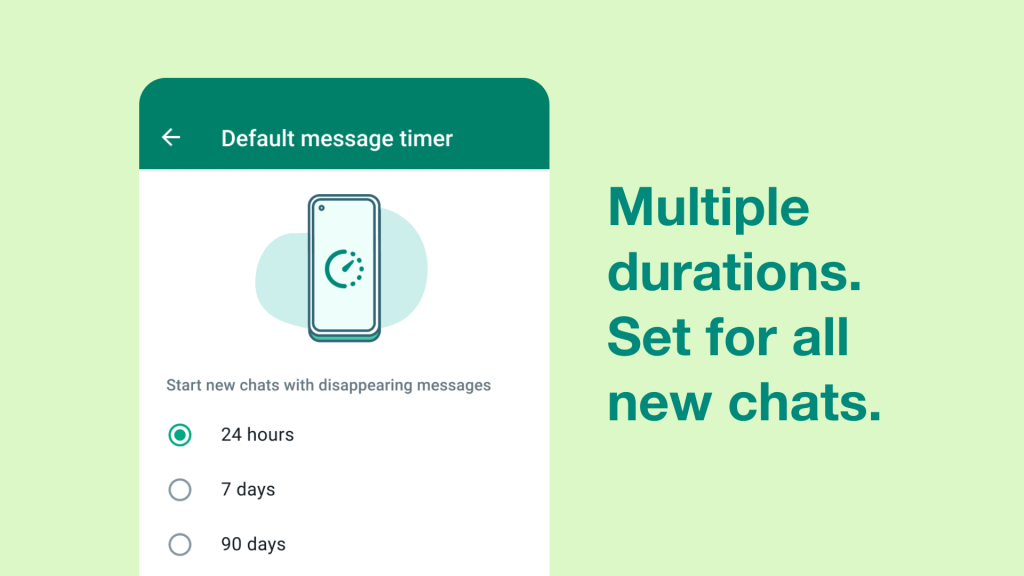
Default Timer Setup
You can make disappearing messages the default for all new chats.
Steps:
- Open WhatsApp Settings
- Tap Account
- Go to Privacy
- Select Default Message Timer
- Choose 24 hours, 7 days, or 90 days
Now, every new chat will automatically use disappearing messages.
Manage Default Settings
- You can disable disappearing messages per chat
- Admins manage group settings
- Default timers affect new chats only
This gives you full flexibility and control.
How to Turn Off Disappearing Messages
Disable in Individual Chats
- Open the chat
- Tap the contact name
- Select Disappearing Messages
- Choose Off
Disable in Group Chats (Admins Only)
- Open the group
- Tap group name
- Select Disappearing Messages
- Choose Off
Messages sent after disabling will stay permanently.
Tips for Using WhatsApp Disappearing Messages
🔐 Privacy Tips
- Use disappearing messages only with trusted contacts
- Avoid sharing critical or legal information
- Understand screenshots can still be taken
⏰ When to Use Disappearing Messages
- Temporary updates
- Sensitive conversations
- Busy group chats
- Reducing message clutter
✅ Best Practices
- Choose the right timer
- Inform chat participants
- Save important content early
- Follow company compliance rules
| Pros | Cons |
|---|---|
| Cleaner chats | Screenshots possible |
| Better privacy | Not legally reliable |
| Reduced storage | Backups may restore |
Boost Your WhatsApp Productivity with WASheet
WASheet helps businesses:
- Send bulk WhatsApp messages efficiently
- Track campaign performance
- Manage contacts and chats
- Export Group Members Contacts & Label Contacts
- Import your Contacts on WhatsApp in bulk (Excel & Google Sheet Supported)
- Improve WhatsApp workflows without violating policies
👉 Explore the complete guide: https://WASheet.com/guide
Frequently Asked Questions (FAQ)
How do I know if disappearing messages are enabled?
You’ll see a timer icon and a system message in the chat.
Can I save disappearing messages?
Yes, by copying text or downloading media before it disappears.
Do old messages disappear automatically?
No, only messages sent after enabling the feature.
Who controls disappearing messages in groups?
Only group admins can enable or disable it.
Can I use different timers for different chats?
Yes, each chat can have its own timer.
Does disappearing messages work on WhatsApp Web?
Yes, it works on Android, iPhone, and WhatsApp Web.
Final Thoughts
Disappearing messages in WhatsApp are a powerful way to protect privacy, reduce clutter, and manage conversations effectively. When combined with WASheet, you gain even more control over WhatsApp communication especially for business and marketing use cases.
🚀 Start using WhatsApp smarter with WASheet today.
I love WASheet. The Google Sheets & Excel feature simplifies messaging. Customer service is outstanding, Thanks, team!

WASheet is my favorite WhatsApp tool! Templates are a lifesaver. With WASheet, I save hours weekly.

My WASheet experience has been incredible. The app is polished, perfect for real estate business. It's a go-to!