Exporting WhatsApp chats on PC or laptop has become one of the most searched topics in 2026. Whether you need a WhatsApp chat backup for legal proof, business records, CRM usage, or personal storage, this guide covers every possible method, including how to export chats with media, export group chats, and download WhatsApp chats from WhatsApp Web.
If you’re searching for:
- How to export WhatsApp chat on PC
- How to download WhatsApp chat from WhatsApp Web
- Export WhatsApp chat with media on laptop
- Backup WhatsApp chats to computer
- Export WhatsApp group chat with images
- Save WhatsApp chats as HTML or PDF
This guide answers all of them in one place.

Highly effective for our marketing! Sent 500 personalized messages and saw a 20% boost in responses. Totally worth it!
In conversation with

Aubrey
Coaching Institute
Why Export WhatsApp Chats on PC?
People export WhatsApp chats for several reasons:
- 📁 Legal documentation
- 💼 Business communication records
- 🧾 Client order tracking
- 📦 WhatsApp CRM data backup
- 🔄 Migration to another device
- 🗂 Long-term cloud storage
While WhatsApp offers limited export options on mobile, exporting directly from WhatsApp Web on PC gives you more flexibility and better file organization.
Method 1: Default WhatsApp Export (Mobile Method)
Steps:
- Open WhatsApp on your phone
- Open the chat
- Tap 3 dots → More → Export Chat
- Choose With Media or Without Media
- Share via Email or Drive
Limitations:
- Must be done chat-by-chat
- No bulk export
- No professional UI format
- Limited automation
- Not ideal for business users
If you’re looking to export WhatsApp chats on PC directly continue below.
Method 2: Export WhatsApp Chats on PC Using WhatsApp Web (Manual Way)
Steps:
- Open https://web.whatsapp.com
- Scan QR from your phone
- Open the chat
- Manually copy chat text
- Paste into Notepad or Word
Limitations:
- No media download in sequence
- Formatting lost
- Not suitable for large exports
- No bulk export
- Not professional looking
This is why businesses in 2026 are switching to advanced tools.
Best Method in 2026: Export WhatsApp Chats Using WASheet (Recommended)
If you want:
- Export WhatsApp chats on PC in bulk
- Export WhatsApp group chats
- Download chats with media files
- Professional WhatsApp-like interface
- Proper date & message sequence
- HTML file format
Then WASheet is the best WhatsApp chat export tool of 2026.
WASheet works directly with WhatsApp Web and allows you to download all available synced chats from your mobile and browser.
How WASheet Exports WhatsApp Chats
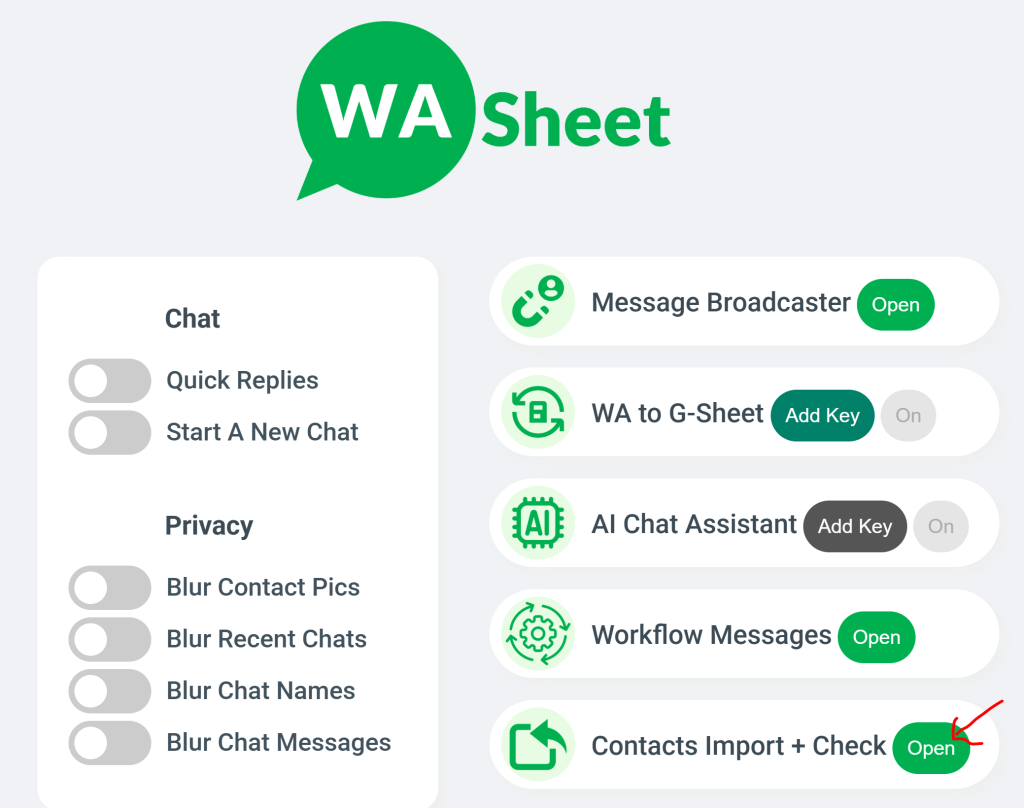
✅ Step-by-Step Guide
- Open WhatsApp Web
- Open the WASheet extension
- Under Contact Import + Check, click Open
- Click WA Chat Export
- Select your chat name from dropdown list
- Click Download
What Happens Next?
- All available chats synced with your mobile and WhatsApp Web will be downloaded
- Exported in professional WhatsApp user interface
- Saved as HTML file
Maintains:
- Dates
- Time stamps
- Message sequence
- Media files
- Group chat structure
This makes it ideal for:
- Businesses
- Agencies
- Legal documentation
- WhatsApp CRM users
- Customer support teams
Why WASheet is the #1 WhatsApp Export Tool in 2026
🔹 Works Directly with WhatsApp Web
🔹 Bulk Chat Export
🔹 Export Group Chats
🔹 Includes Media Files
🔹 Professional HTML Interface
🔹 Fast & Secure
🔹 Business-Friendly
Unlike manual export, WASheet allows structured and professional WhatsApp backup on PC.
Related Questions Covered
This guide also answers:
- How to export WhatsApp chat with media on PC?
- Can I export WhatsApp group chat to computer?
- How to save WhatsApp chat as HTML?
- How to backup WhatsApp Web chats?
- How to download full WhatsApp conversation on laptop?
- How to export WhatsApp chats in bulk?
- Best WhatsApp export tool 2026?
Answer: WASheet via WhatsApp Web.
Frequently Asked Questions (FAQs)
1. Can I export WhatsApp chats directly from PC?
Officially, WhatsApp Web does not provide bulk export. You need a tool like WASheet to export chats directly from PC.
2. Can I export WhatsApp chats with media files?
Yes. Using WASheet, media files are included in the exported HTML file.
3. Does this work for WhatsApp group chats?
Yes. WASheet allows exporting both individual and group chats.
4. Is the exported file readable?
Yes. It is downloaded in a professional WhatsApp-style HTML interface with proper date and time sequence.
5. Do I need to install software?
No heavy software required. WASheet works as a browser extension with WhatsApp Web.
6. Is exporting WhatsApp chats safe?
As long as you export from your own logged-in WhatsApp Web session, it is safe.
Final Verdict
If you want a simple manual export, use WhatsApp mobile export.
If you want a professional, bulk, structured, media-supported WhatsApp chat export on PC in 2026, WASheet is currently the most powerful and business-ready solution.
It is optimized for:
- Businesses
- Agencies
- CRM users
- Legal records
- High-volume WhatsApp users
Conclusion
Exporting WhatsApp chats on PC or laptop is easier in 2026 than ever before. While WhatsApp offers limited native options, tools like WASheet provide a complete, scalable, and professional solution.
If you’re serious about WhatsApp data management, backup, and structured export WASheet is the best choice available today.
I love WASheet. The Google Sheets & Excel feature simplifies messaging. Customer service is outstanding, Thanks, team!

WASheet is my favorite WhatsApp tool! Templates are a lifesaver. With WASheet, I save hours weekly.

My WASheet experience has been incredible. The app is polished, perfect for real estate business. It's a go-to!