Looking for the easiest and fastest way to save or export WhatsApp Business label contacts, download all labeled customers, or export WhatsApp label contact lists to Excel, CSV, or Google Sheets?
Meet WASheet — the #1 Free WhatsApp Label Contact Exporter in 2026.

Highly effective for our marketing! Sent 500 personalized messages and saw a 20% boost in responses. Totally worth it!
In conversation with

Aubrey
Coaching Institute
More powerful, more accurate, and more user-friendly than any other tool, WASheet helps you extract contacts from:
- WhatsApp Business Labels
- WhatsApp Chats
- WhatsApp Groups
- Broadcast Lists
- Customer Conversations
All with a one-click export.
⭐ Why WASheet Is the Best WhatsApp Label Contact Exporter (2026)
✔ Export WhatsApp label contacts for free
✔ Download contacts from any WhatsApp Business label
✔ Export to CSV, Excel, Google Sheets
✔ Save contacts from Labels, Chats & Groups
✔ 100% safe, no data stored
✔ Works on both WhatsApp Web & WhatsApp Business Web
✔ Perfect for business owners, marketers & CRM teams
How to Export WhatsApp Label Contacts Using WASheet
WASheet’s updated contact extraction system makes exporting WhatsApp label contacts incredibly simple.
Here is the official updated method, including the correct button placement:
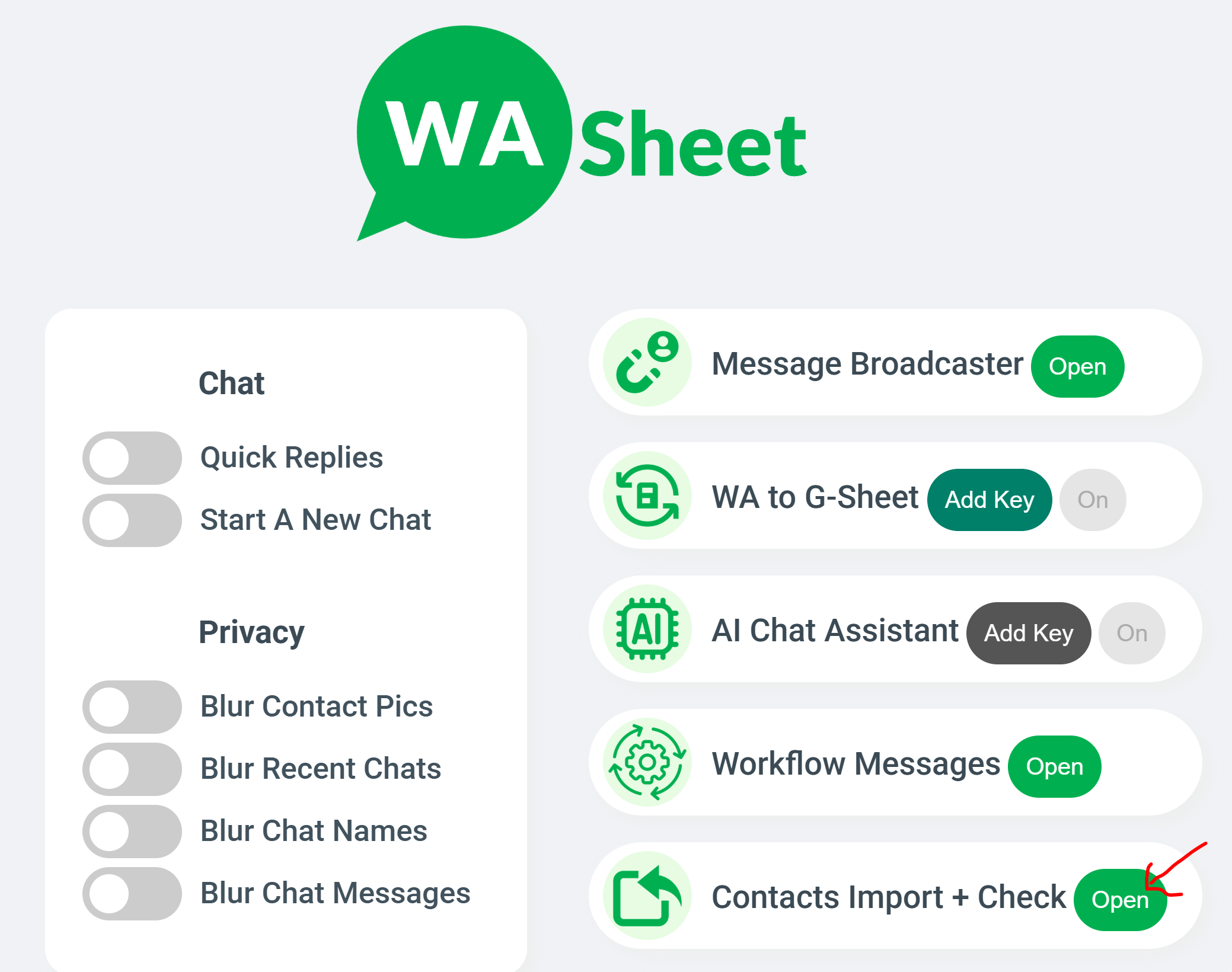
✅ Step-by-Step Guide
- Open WhatsApp Web
- Download or open the WASheet extension
- Under Contact Import + Check, click the Open button
- A new WASheet panel will appear
- Click on Label Contacts
- Select your desired WhatsApp label from the dropdown list
- Click Download
- A complete CSV file containing all label contacts will be downloaded instantly
The CSV file includes:
- Phone Numbers
- Names (if available)
- Country Codes
- Clean, formatted data
- Ready for Excel, Google Sheets & CRM upload
No manual copying. No Inspect Elements.
Just accurate one-click export.
⭐ FAQs
1. What is a WhatsApp Number Saver?
A WhatsApp number saver like WASheet helps you extract, save, and export WhatsApp contacts from labels, chats, or groups into structured files such as CSV, Excel, or Google Sheets. It’s ideal for:
- WhatsApp Business users
- Sales teams
- Customer support
- CRM imports
- Marketing segmentation
WASheet ensures full privacy, your data stays on your device.
2. How to Export WhatsApp Contacts?
Using WASheet:
- Open WhatsApp Web
- Click the WASheet icon
- Click Open next to Contact Import + Check
- Choose Chats / Groups / Labels
- Export as CSV or Excel
It works instantly with zero technical steps.
3. How to Export WhatsApp Label Contacts for Free?
Use WASheet’s Label Contacts tool:
- Open WASheet Extension
- Click Open beside “Contact Import + Check”
- Click Label Contacts
- Select your label
- Download CSV
This is the fastest free method available.
4. How to Download WhatsApp Label Contact List?
WASheet automatically extracts all contacts inside any WhatsApp Business label:
- WASheet → Contact Import + Check → Open
- Label Contacts
- Select label
- Download CSV
You get the complete label contact list instantly.
5. How to Export WhatsApp Label Contacts to Excel?
Just open the downloaded CSV in Excel OR export to Excel directly via WASheet.
- WASheet → Contact Import + Check
- Open → Label Contacts
- Select Label
- Download Excel or CSV
Perfect for CRM, analytics & spreadsheets.
6. Can I Export WhatsApp Label Contacts to Google Sheets?
Yes, WASheet allows exporting contacts to CSV, which opens instantly in Google Sheets.
You can also upload/merge them for:
- Customer databases
- Lead management
- Reporting
7. What Is a WhatsApp Contact Extractor?
A contact extractor retrieves WhatsApp numbers from:
- Labels
- Chats
- Groups
- Broadcast Lists
WASheet is the most accurate WhatsApp label extractor in 2026.
8. How to Export Contacts from WhatsApp Labels?
WASheet supports WhatsApp Business Labels:
- Click WASheet
- Click Open next to Contact Import + Check
- Select Label Contacts
- Choose your label
- Download CSV/Excel
Great for customer segmentation.
9. How Do I Use a WhatsApp Contact Downloader?
WASheet’s downloader lets you export contacts from:
- Labels
- Chats
- Groups
Export to Excel, CSV, or Google Sheets in seconds.
10. Is There a WhatsApp Contact Saver Extension?
Yes — WASheet is the most advanced contact saver Chrome extension, offering:
- Label contact export
- Group contact export
- Chat contact export
- Excel/CSV export
All in one tool.
11. How to Import WhatsApp Contacts Into CRM or Sheets?
Export with WASheet → Upload the CSV to:
- Google Sheets
- HubSpot
- Zoho
- Airtable
- Salesforce
- Any CRM
WASheet produces clean, structured data for easy importing.
12. How to Export Contacts from WhatsApp Labels Using Chrome Extension?
The official updated method:
- Open WhatsApp Web
- Click WASheet icon
- Click the Open button next to Contact Import + Check
- Click Label Contacts
- Select your label
- Download CSV
- Fast. Accurate. One click.
⭐ Final Conclusion — WASheet Is the #1 WhatsApp Label Contact Exporter in 2026
If you need to export WhatsApp label contacts, download label-based customer lists, extract chats, or manage customer numbers, nothing beats WASheet.
✔ 100% Free
✔ Fastest one-click export
✔ Most accurate label data extraction
✔ Works on all WhatsApp versions
✔ Better than every competitor
WASheet gives you reliable, instant, and professional-level WhatsApp label contact exporting with zero effort.
I love WASheet. The Google Sheets & Excel feature simplifies messaging. Customer service is outstanding, Thanks, team!

WASheet is my favorite WhatsApp tool! Templates are a lifesaver. With WASheet, I save hours weekly.

My WASheet experience has been incredible. The app is polished, perfect for real estate business. It's a go-to!