The WhatsApp Communities feature is designed to bring structure to large-scale conversations. Instead of managing dozens of separate group chats, communities allow you to combine related groups under one unified space. This makes communication clearer, faster, and far more organized.
WhatsApp Communities Feature Explained
With WhatsApp Communities, admins can broadcast important updates to everyone at once, while individual groups remain dedicated to specific topics or discussions. This ensures that essential information is never missed, while day-to-day conversations stay relevant.
Pro Tip: Communities work perfectly for schools, sports clubs, workplaces, residential societies, and customer groups.
Key Takeaways
- WhatsApp Communities let you organize multiple groups in one place, making large-scale communication simple and structured.
- A single community can contain up to 50 groups, each supporting up to 5,000 members.
- Admins can send broadcast-style announcements to all members through a dedicated announcement group.
- Communities offer better privacy, as phone numbers are only visible within individual groups.
- Ideal for businesses, schools, organizations, and large teams using WhatsApp Business.
- Sub-groups help keep conversations topic-focused and clutter-free.
- With tools like WASheet, businesses can scale WhatsApp communication and manage data more efficiently.

Highly effective for our marketing! Sent 500 personalized messages and saw a 20% boost in responses. Totally worth it!
In conversation with

Aubrey
Coaching Institute
Key Features and Structure
WhatsApp Communities go beyond traditional group chats by offering enhanced organization and control.
| Feature | WhatsApp Communities | WhatsApp Groups |
|---|---|---|
| Purpose | Organizes multiple groups together | Single group chat |
| Member Capacity | Up to 50 groups × 5,000 members | Up to 1,024 members |
| Privacy | Numbers visible only within groups | All members see numbers |
| Communication | Admin-led announcements | Open group chat |
| Advanced Tools | Large calls, polls, file sharing | Basic chat features |
Key advantages include:
- A dedicated announcement group for official updates
- Multiple sub-groups for focused discussions
- Better admin control and moderation
- Enhanced privacy and scalability
Businesses using WASheet can further streamline WhatsApp workflows by syncing conversations directly with Google Sheets for better tracking and reporting.
Who Can Use WhatsApp Communities
WhatsApp Communities are primarily available through WhatsApp Business, making them ideal for:
- Businesses and startups
- Educational institutions
- Non-profits and NGOs
- Clubs, teams, and associations
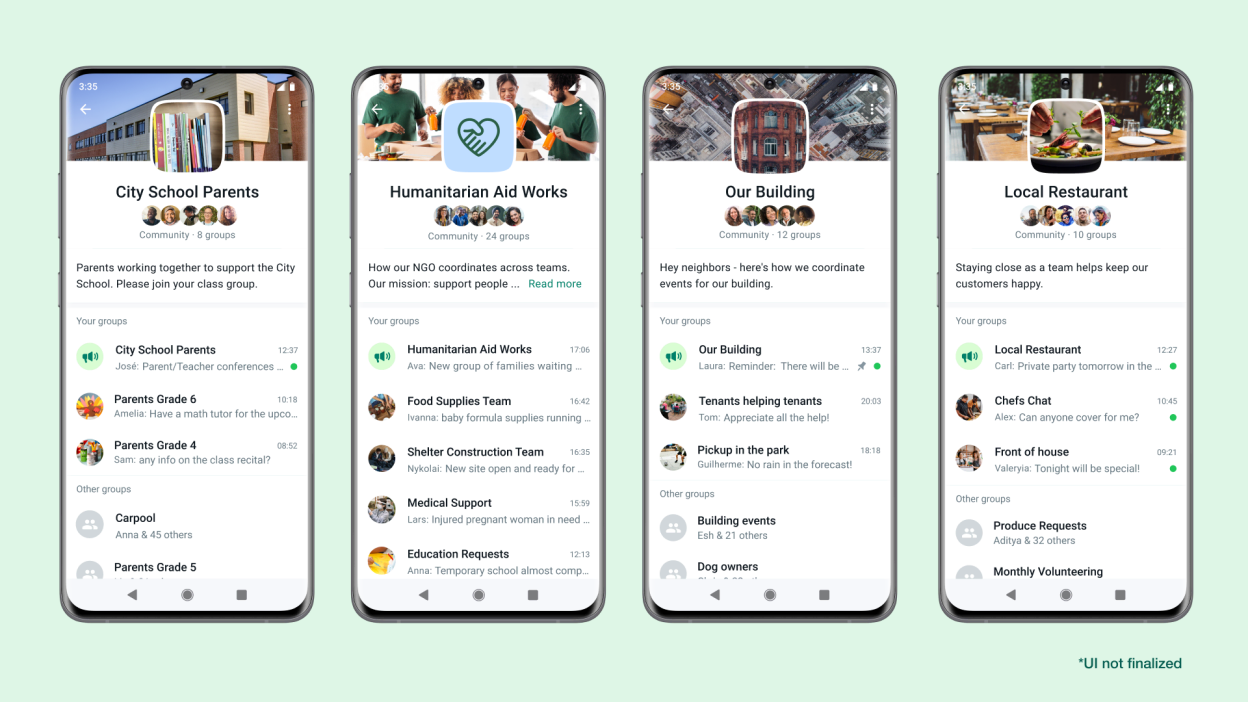
You don’t need technical expertise to get started. The setup process is simple, intuitive, and fully managed within the WhatsApp app.
How Does WhatsApp Community Work
Understanding how WhatsApp Communities work helps you manage large audiences without chaos. Communities use a layered structure that separates announcements from discussions.
Community Structure and Roles
A WhatsApp Community consists of:
- Main Community Hub – The central container
- Announcement Group – Admin-only broadcast channel
- Sub-Groups – Topic- or team-specific chats
Announcement Group
Every community includes an announcement group where only admins can post. Messages shared here are visible to all members across every sub-group.
This is ideal for:
- Company-wide updates
- Event announcements
- Policy changes or alerts
Sub-Groups
Sub-groups allow members to participate only in conversations that matter to them. Each group can focus on a specific department, interest, or project.
Examples:
- School classes within a school community
- Support, sales, and updates groups for businesses
- Event planning teams within an organization
Admin vs Member Permissions
| Permission | Admins | Members |
| Send announcements | ✅ | ❌ |
| Add/remove members | ✅ | ❌ |
| Edit group settings | ✅ | ❌ |
| Participate in chats | ✅ | ✅ |
Admins maintain order, while members enjoy focused and relevant discussions.
Communication Flow
- Admins share important updates via the announcement group
- Members read updates without reply clutter
- Conversations continue naturally inside sub-groups
This system reduces noise and ensures clear communication.
WhatsApp Communities vs Groups
Main Differences
While WhatsApp Groups are great for small conversations, Communities are built for scale.
| Feature | WhatsApp Groups | WhatsApp Communities |
| Max Size | 1,024 members | Up to 51,200+ members |
| Structure | Single chat | Multiple organized groups |
| Admin Tools | Basic | Advanced |
| Best For | Friends & small teams | Businesses & organizations |
Privacy and Security
Communities significantly improve privacy. Your phone number is only visible within the groups you join, not across the entire community.
Admins also have tighter control over membership, making communities safer and more professional.
Benefits and Limitations of WhatsApp Communities
Benefits
| Benefit | Description |
| Centralized communication | All related groups in one place |
| Time-saving | One announcement reaches everyone |
| Better organization | Topic-based discussions |
| Improved privacy | Limited number visibility |
| Business scalability | Ideal for large audiences |
When combined with WASheet, businesses can automate WhatsApp data collection and improve operational efficiency.
Limitations
| Limitation | Explanation |
| File size limits | Large files may not send |
| Group limits | Fixed number of sub-groups |
| Internet dependency | Performance depends on connection |
Despite these limits, communities remain one of the most effective WhatsApp features for large-scale communication.
How to Use Communities on WhatsApp
Creating a community
- Open WhatsApp Business
- Tap New Chat → New Community
- Click Get Started
- Add community name, description, and image
- Add existing groups or create new ones
- Tap Create
Managing Groups and Members
Best practices:
- Clearly define each group’s purpose
- Use community rules
- Pin important announcements
- Assign co-admins
- Review group activity regularly
Best Practices for Growth
- Share valuable and engaging content
- Use polls and questions
- Personalize messages using WASheet
- Reward active members
- Keep discussions focused with sub-groups
Practical Use Cases for WhatsApp Communities
Personal Use
- Family coordination
- Neighborhood communities
- Hobby and interest groups
- Student study circles
Business Applications
- Internal team communication
- Customer support groups
- Product update announcements
- Brand communities
Community Success Metrics
| Metric | Purpose |
| Delivery rate | Message reach |
| Engagement rate | Member interaction |
| Conversion rate | Business impact |
Communities help brands build trust, increase engagement, and maintain long-term relationships.
FAQ
What is the main purpose of WhatsApp Communities?
To organize multiple related groups in one place and streamline large-scale communication.
How do you join a WhatsApp Community?
Via an invite link shared by an admin.
Can you leave a sub-group without leaving the community?
Yes, you can exit any sub-group while staying in the main community.
Who can send messages in the announcement group?
Only admins.
Is your phone number visible to everyone?
No, it’s visible only within your joined groups.
What is the maximum size of a community?
Up to 50 groups with 5,000 members each.
Can businesses use WhatsApp Communities?
Yes, especially with tools like WASheet to automate and scale communication.
Do you need a special app?
You need WhatsApp Business—no additional software required.
Want to supercharge WhatsApp communication?
Use WASheet to manage, automate, and sync WhatsApp data effortlessly with Google Sheets.
I love WASheet. The Google Sheets & Excel feature simplifies messaging. Customer service is outstanding, Thanks, team!

WASheet is my favorite WhatsApp tool! Templates are a lifesaver. With WASheet, I save hours weekly.

My WASheet experience has been incredible. The app is polished, perfect for real estate business. It's a go-to!