Looking for a WhatsApp bulk message sender free of cost? WASheet is a free browser extension that lets you send WhatsApp bulk messages directly from Excel or Google Sheets no per-message fees, no API setup, and no coding required. Instead of messaging contacts one by one, you simply upload your spreadsheet, choose a template, and WASheet handles the rest, making it one of the easiest free tools for businesses that want to run WhatsApp campaigns at scale.
Managing WhatsApp outreach manually is slow, especially when you need to contact hundreds or thousands of customers. WASheet simplifies the entire process by allowing you to send personalized WhatsApp messages directly from Excel spreadsheets, Google Sheets, CSV files, and other supported formats all from your browser.
Whether you’re running marketing campaigns, sending order updates, sharing invoices, or communicating with customers, WASheet offers a fast, reliable, and user-friendly solution without requiring coding skills or complex software.
What is WASheet (A Free WhatsApp Bulk Message Sender)?
WASheet is a browser extension designed for businesses, marketers, sales teams, customer support agents, and freelancers who need to send WhatsApp bulk messages efficiently.

WASheet makes WhatsApp bulk messaging easy. Instead of copying and pasting phone numbers one by one, you simply upload your contact list, choose a message template, and let WASheet handle the rest.
Key Highlights
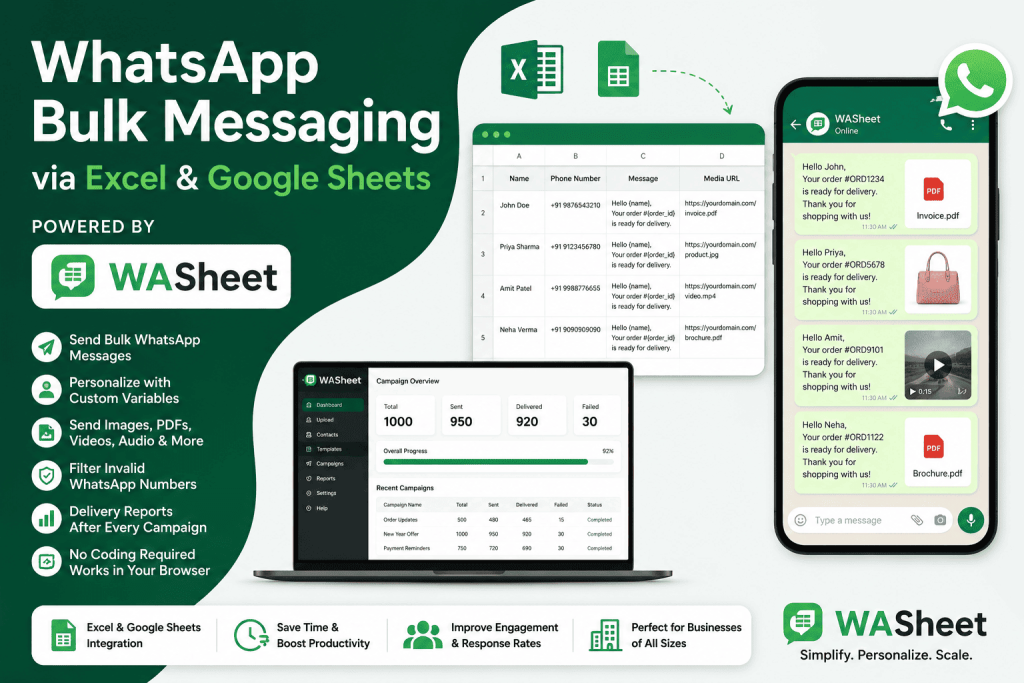
- Send WhatsApp bulk messages from Excel or Google Sheets
- Personalize every message using custom variables
- Send images, PDFs, videos, audio, and other files
- Automatically filter invalid WhatsApp numbers
- Generate delivery reports after every campaign
- No programming or technical experience required
- Works directly in your browser
Send Bulk WhatsApp Messages from Excel
One of WASheet’s biggest advantages is its ability to work with spreadsheet files that businesses already use every day.
Instead of manually entering contacts into WhatsApp, simply upload your spreadsheet and start your campaign in minutes. Watch the below video to learn how to send whatsapp bulk messages:
Supported spreadsheet formats include:
- Excel (.xlsx)
- Excel (.xls)
- CSV
- Google Sheets
- ODS
- CRM exports
- Customer database files
As long as your file contains WhatsApp numbers, WASheet can import and prepare your contacts automatically.
Import Contacts from Google Sheets
Many businesses maintain customer lists inside Google Sheets because they are easy to update and share.
WASheet supports direct Google Sheet imports using a public spreadsheet link.
The process is simple:
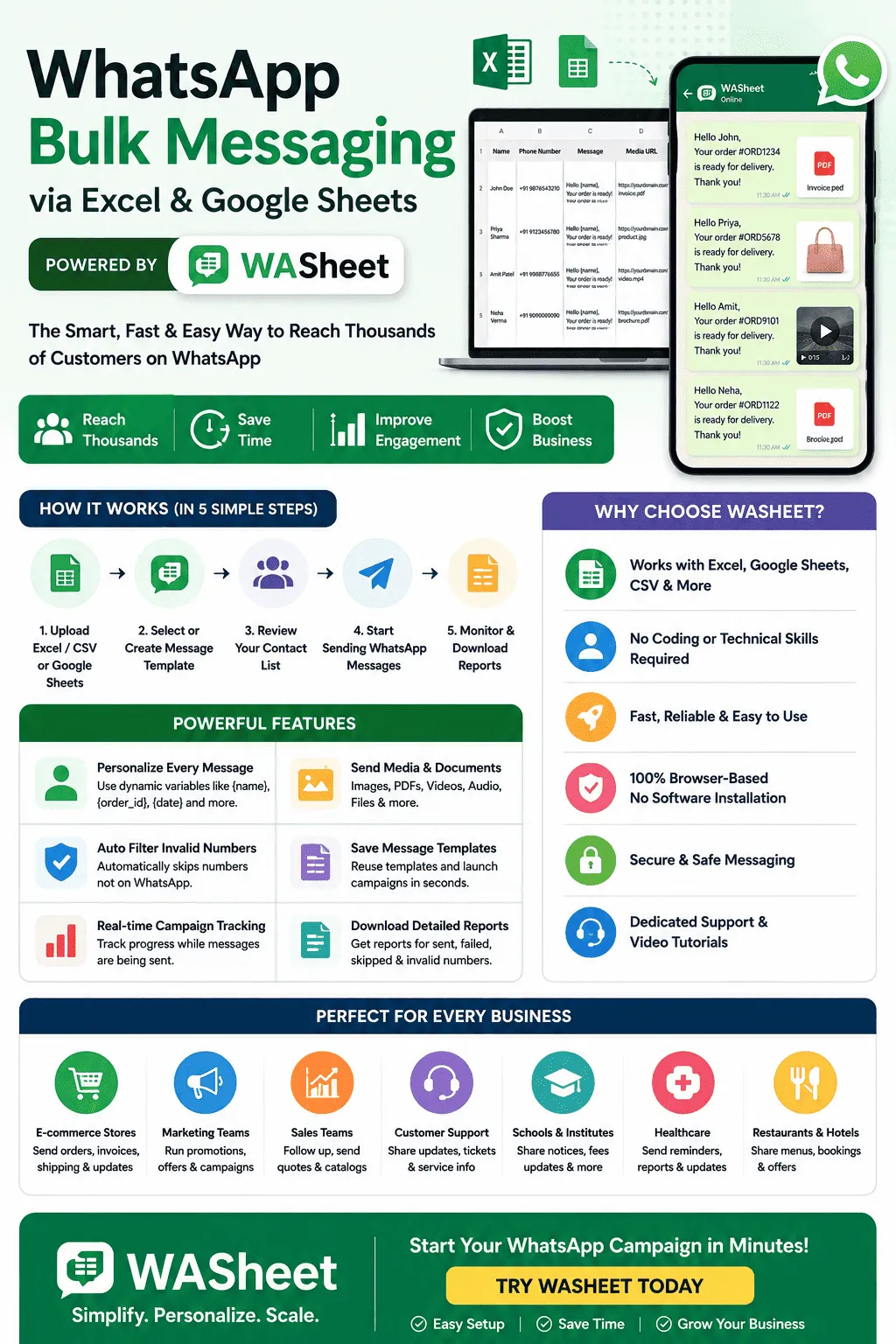
- Upload your Excel file or paste a Google Sheets URL.
- Select an existing message template or create a new one.
- Review your contact list.
- Start sending WhatsApp messages.
- Monitor delivery progress in real time.
This workflow saves hours compared to manual messaging.
Personalize Every WhatsApp Message
Generic messages often receive lower engagement.
WASheet supports dynamic variables, allowing each recipient to receive a personalized message while you only write it once.
For example:
Hello {name},
Your order #{order_id} is ready for delivery.
Thank you for shopping with us.
If your spreadsheet contains columns for Name and Order ID, WASheet automatically replaces each placeholder with the correct customer information.
This feature is perfect for:
- Order confirmations
- Appointment reminders
- Delivery updates
- Customer support
- Promotional campaigns
- Payment reminders
- Event invitations
Personalized communication creates a better customer experience and increases response rates.
Send Images, PDFs, Videos, Audio, and Documents
Modern WhatsApp campaigns are more effective when they include rich media.
WASheet supports sending multimedia files together with your text messages.
Simply add a media URL inside your spreadsheet, and WASheet automatically attaches it during sending.
You can send:
- Product images
- Company brochures
- PDF invoices
- Receipts
- Menus
- Price lists
- Product catalogs
- Videos
- Audio messages
- Voice greetings
- Presentation files
This makes campaigns more engaging while reducing manual work.
Automatically Filter Invalid WhatsApp Numbers
Sending messages to inactive or invalid numbers wastes both time and resources.
WASheet automatically checks phone numbers before sending messages.
It can identify numbers that are not registered on WhatsApp and skip them automatically.
Benefits include:
- Better delivery rates
- Fewer failed messages
- Cleaner contact lists
- Improved campaign performance
- Reduced unnecessary sending
Everything happens automatically without requiring manual verification.
Save Time with Message Templates
If you frequently send similar messages, WASheet allows you to save reusable templates.
Instead of rewriting messages every time, simply select an existing template and launch your campaign.
Templates are ideal for:
- Marketing promotions
- Order updates
- Customer follow-ups
- Welcome messages
- Support responses
- Festival greetings
- Appointment reminders
Premium users can save unlimited templates for even faster campaign management.
Easy-to-Use Interface
One reason businesses choose WASheet is its beginner-friendly design.
Everything is organized into a straightforward workflow.
You can easily:
- Upload contact files
- Select recipients
- Create templates
- Add media attachments
- Start campaigns
- View progress
- Download reports
No technical knowledge or software installation is required beyond the browser extension.
A detailed video tutorial is also available to help first-time users get started quickly.
Download WhatsApp Campaign Reports
After every campaign, WASheet generates a detailed report showing the outcome of your messages.
Reports include:
- Successfully sent messages
- Failed deliveries
- Skipped numbers
- Invalid WhatsApp numbers
These reports help businesses analyze campaign performance and maintain accurate customer databases.
Supported File Formats
WASheet works with most popular spreadsheet and database formats, making it easy to migrate from existing systems.
Supported formats include:
- Excel (.xlsx)
- Excel (.xls)
- CSV
- Google Sheets
- ODS
- CRM exports
- Customer databases
- Contact lists with phone numbers and media links
This flexibility allows businesses to use their existing customer data without extra formatting.
Who Can Benefit from WASheet?
WASheet is suitable for almost any organization that communicates with customers through WhatsApp.
Common use cases include:
Marketing Campaigns
Promote products, services, seasonal offers, discounts, and new arrivals using personalized bulk WhatsApp messages.
Sales Teams
Follow up with leads, send quotations, product catalogs, and pricing information.
Customer Support
Share order updates, support tickets, troubleshooting guides, and service notifications.
E-commerce Stores
Send invoices, payment confirmations, shipping updates, delivery notifications, and product recommendations.
Schools and Educational Institutions
Notify students about classes, exams, schedules, fees, and announcements.
Healthcare Providers
Send appointment reminders, prescriptions, lab reports, and patient updates.
Restaurants and Hotels
Share menus, booking confirmations, promotional offers, and reservation details.
Why Businesses Choose WASheet
Businesses need tools that are simple, reliable, and efficient.
WASheet combines all the essential features required for professional WhatsApp communication in one platform.
Its biggest advantages include:
- Easy Excel and Google Sheets integration
- Personalized bulk messaging
- Multimedia support
- Automatic number validation
- Reusable message templates
- Real-time campaign tracking
- Downloadable delivery reports
- Browser-based workflow
- No coding required
These features help businesses save time while improving customer communication.
Best Practices for WhatsApp Bulk Messaging
To get the best results from your campaigns:
- Keep messages clear and concise.
- Personalize every message using customer data.
- Include relevant media only when it adds value.
- Use accurate and updated contact lists.
- Monitor delivery reports regularly.
- Avoid sending excessive promotional messages.
- Follow WhatsApp’s policies and obtain appropriate consent from recipients.
Consistent, relevant communication helps improve engagement and customer trust.
Frequently Asked Questions
Is there a free WhatsApp bulk message sender?
Yes, WASheet is a free WhatsApp bulk message sender that lets you send personalized messages to multiple contacts safely, directly from Excel or Google Sheets, with no API setup or per-message charges. It works as a browser extension with built-in anti-ban protection like sending delays and number validation, automatically filters invalid numbers, supports images and documents, and gives you a delivery report after each campaign so you can track what was sent successfully.
Can I send WhatsApp messages directly from Excel?
Yes. WASheet lets you upload Excel spreadsheets and send personalized WhatsApp messages to all contacts without manually copying numbers.
Does WASheet support Google Sheets?
Yes. You can import contacts directly using a public Google Sheets link or upload exported spreadsheet files.
Can I send PDFs and images?
Yes. WASheet supports images, PDF documents, videos, audio files, brochures, invoices, catalogs, and other media attachments.
Does WASheet personalize messages?
Absolutely. Dynamic variables such as customer name, order number, appointment date, invoice ID, or any spreadsheet column can be inserted automatically into every message.
Does WASheet check invalid WhatsApp numbers?
Yes. The extension automatically identifies invalid or inactive WhatsApp numbers and skips them during the campaign.
Final Verdict
If you’re looking for an efficient way to send bulk WhatsApp messages free from Excel or Google Sheets, WASheet is a practical solution that combines ease of use with powerful automation features.
Its support for spreadsheet imports, personalized messaging, multimedia attachments, automatic number validation, reusable templates, and downloadable reports makes it well suited for businesses of all sizes. Whether you’re running marketing campaigns, sending customer updates, managing sales outreach, or providing support, WASheet helps streamline communication while reducing repetitive manual work.
For organizations that rely on WhatsApp as a customer communication channel, WASheet offers a straightforward way to organize, personalize, and scale messaging directly from the tools they already use.