
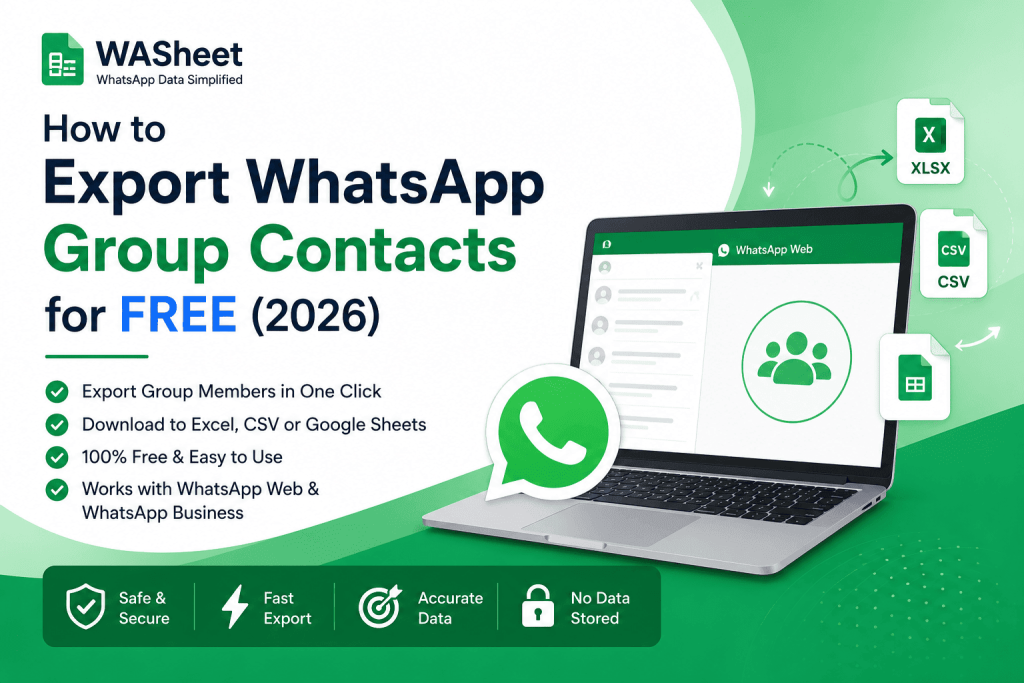
Whether you need to export, extract, or download WhatsApp group contacts to Excel, CSV, or Google Sheets the fastest and safest way in 2026 is WASheet, a free Chrome extension that works as a complete WhatsApp group contacts exporter, pulling member names, phone numbers, and country codes directly from WhatsApp Web into a ready-to-use file. No manual copying, no developer tools, and no coding required.
This guide covers how to export WhatsApp group contacts step by step, whether you want the final list in Excel, CSV, or Google Sheets.
Quick Answer: To export WhatsApp group contacts, use WASheet a free Chrome/Edge extension that reads a group’s member list from WhatsApp Web and exports names, phone numbers, and country codes to a CSV or Excel file in one click. Open WhatsApp Web, install WASheet, select Group Contacts, choose your group, and click Download. No coding, no manual copying, and it works with both WhatsApp Web and WhatsApp Business.
This works for any WhatsApp group, whether you’re backing up members, building a customer database, or importing leads into a CRM. The guide below covers every step, from opening WhatsApp Web to downloading your finished contact list.
Managing WhatsApp communities, customer groups, or team chats often means keeping an up-to-date contact list. Whether you want to back up members, import contacts into a CRM, analyze customer data, or simply save phone numbers, exporting WhatsApp group contacts can save hours of manual work.
Watch the below youtube video to learn How to Export or Download WhatsApp Group Contacts to Excel:
This guide explains the easiest way to export or extract WhatsApp group members in 2026 using WASheet, a powerful Chrome extension designed for businesses, marketers, sales teams, and anyone who needs to organize WhatsApp contacts efficiently.
Unlike manual methods that require copying numbers one by one or using browser developer tools, WASheet lets you download complete WhatsApp contact lists in just a few clicks.
Why Extract or Export WhatsApp Group Contacts?
There are many legitimate reasons to export WhatsApp contacts, including:
- Backing up important group members
- Building a customer database
- Importing contacts into a CRM
- Creating Excel reports
- Organizing leads for marketing campaigns
- Managing communities more efficiently
- Moving contacts into Google Sheets
Whether you’re running a business or managing a large community, having contacts in a structured spreadsheet makes future communication much easier.
Why Choose WASheet?
WASheet is an all-in-one WhatsApp productivity extension that helps you export group contacts directly from WhatsApp Web without complicated setup.
Key Features
- Export WhatsApp group contacts for free
- Download complete member lists instantly
- Export to CSV, Excel, or Google Sheets
- Clean and organized data
- Works with WhatsApp Web and WhatsApp Business
- Privacy-focused with no contact data stored on external servers
Whether you’re handling dozens or thousands of contacts, WASheet simplifies the entire process.
WASheet: Export, Extract & Download WhatsApp Group Contacts
WASheet is built specifically as a WhatsApp group contacts exporter not a general scraping tool or browser script. It runs as a Chrome/Edge extension, connects directly to WhatsApp Web, and reads a group’s member list the same way you’d see it on screen, then packages it into a downloadable file.
As a dedicated exporter, WASheet handles:
Group contacts: Full member lists from any group you belong to
Chat contacts: Numbers from individual conversations
Label contacts: WhatsApp Business labeled customer lists
Broadcast List Contacts: Recipients from your broadcast groups
If you searched for a “WA group contacts exporter” or “WA group number exporter,” this is the tool WASheet is the same extension, just shorthand for WhatsApp. No separate installation or plan is needed to access the group exporter feature.
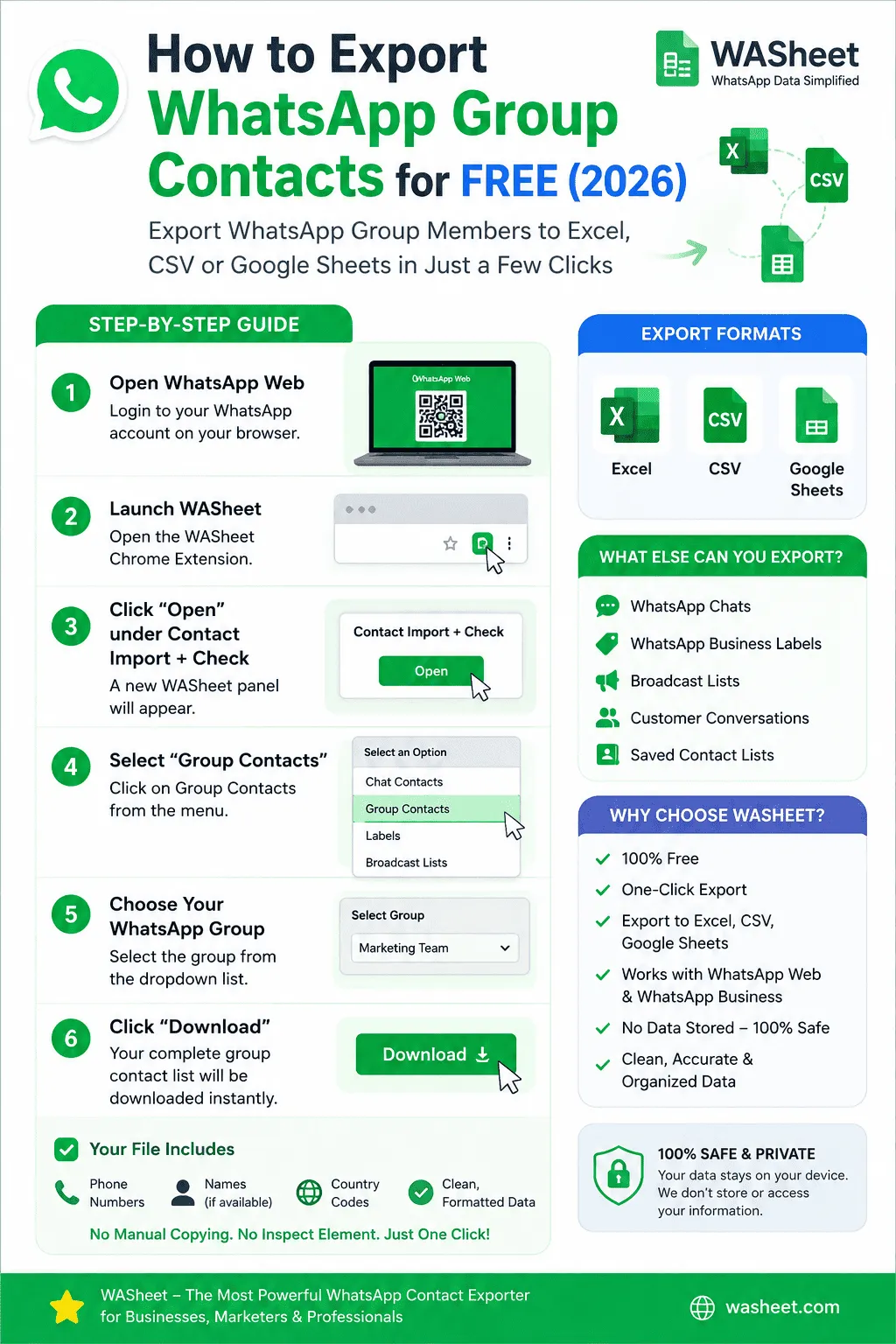
How to Download or Export WhatsApp Group Contacts
Exporting contacts takes only a few minutes.
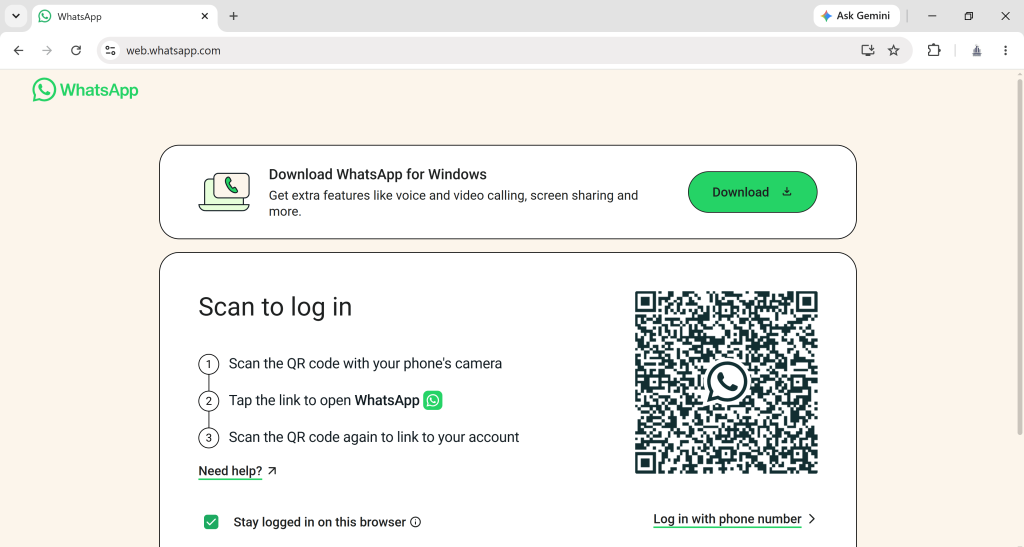
Step 1: Open WhatsApp Web
Sign in to your WhatsApp Web account through your browser.
Step 2: Install WASheet
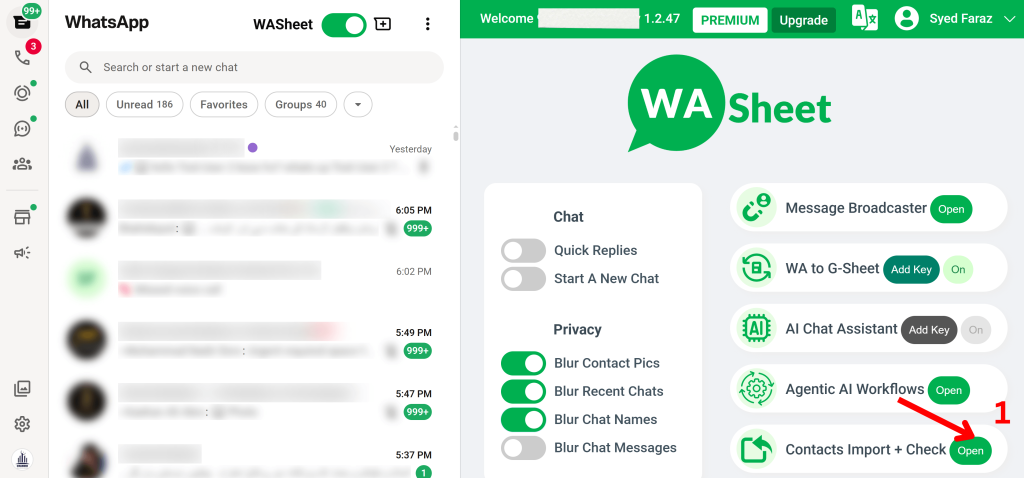
Install and open the WASheet Chrome Extension.
Inside the dashboard, locate Contact Import + Check and click Open.
Step 3: View the WhatsApp Group Members List
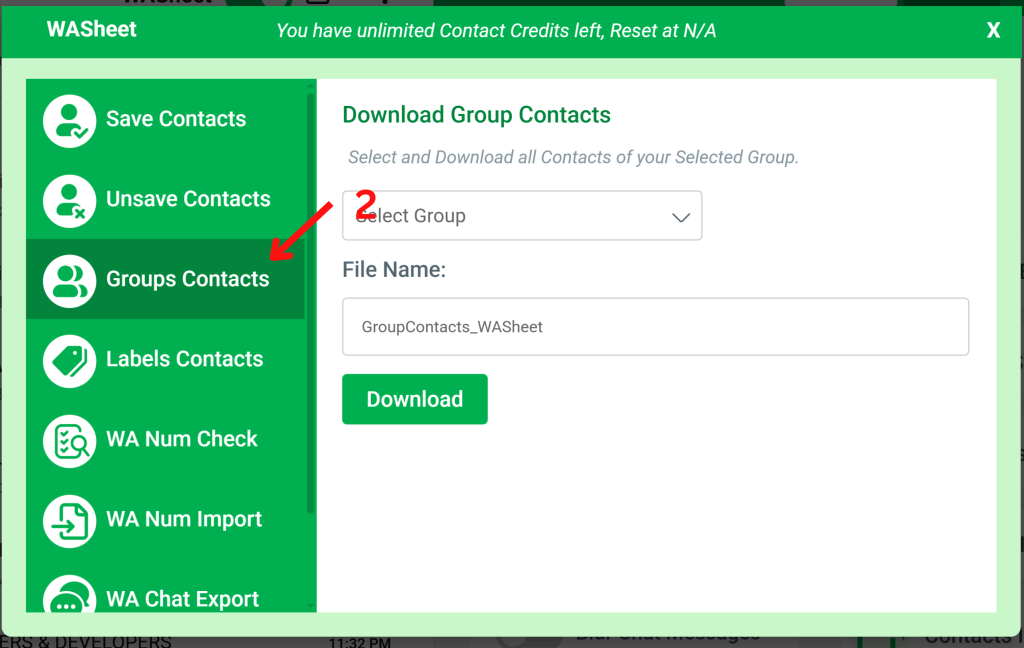
A new contact management panel will appear, showing every group you’re part of.
Select Group Contacts to load the full members list for any group including numbers that were never saved to your phone’s address book.
Step 4: Choose Your WhatsApp Group
Select the group you want to export from the dropdown list.
Step 5: Download Your Contact List
Click Download.
WASheet instantly generates your export file.
Your downloaded file includes:
- Phone numbers
- Contact names (when available)
- Country codes
- Clean spreadsheet formatting
- CSV ready for Excel, Google Sheets, and CRM import
No coding.
No browser inspection.
No manual copying.
Need to Export Labels or Chats Instead?
This guide focuses on exporting WhatsApp group contacts. If you’re looking to export WhatsApp Business Labels or individual chat contacts, we’ve got dedicated guides for those:
Also Read: How to Export WhatsApp Label Contacts
This makes it an excellent solution for businesses that organize customers using labels or maintain multiple communication channels.
Note: If you just want to copy your group’s contact list out for backup, a spreadsheet, or a CRM — not move members into a different WhatsApp group — you’re already in the right place. See the export steps above. The section below is specifically for copying members between two WhatsApp groups.
How to Copy WhatsApp Group Contacts to Another Group
WhatsApp doesn’t have a built-in way to bulk-copy members from one group into another — numbers have to be added one at a time through Group Info → Add Participants, which is slow for anything beyond a handful of people.
The faster route:
1. Export the source group: Open WASheet, select Group Contacts, choose the group you want to copy from, and click Download to get a CSV or Excel file of every member’s number.
2. Clean the list if needed: Remove any numbers you don’t want to carry over, or filter by country code, in Excel or Google Sheets.
3. Add to the new group: Open the destination group in WhatsApp, go to Add Participants, and add numbers from your exported list. For large groups, WASheet’s contact list makes it easy to work through the list systematically rather than searching WhatsApp one contact at a time.
This same export-then-add approach works whether you’re merging two communities, migrating members after creating a new group, or rebuilding a group from a backup list.
Export Formats Supported
CSV
Compatible with nearly every CRM, spreadsheet application, and marketing platform.
Microsoft Excel
Open, edit, filter, and organize contacts immediately in Excel.
Google Sheets
Upload the exported CSV directly into Google Sheets for cloud-based collaboration and reporting.
Who Should Use a WhatsApp Contact Exporter?
WASheet is ideal for:
- Small businesses
- Sales teams
- Marketing agencies
- Customer support teams
- Community managers
- Real estate professionals
- Educational institutions
- Healthcare providers
- Event organizers
- Freelancers and consultants
Anyone who communicates with customers through WhatsApp can benefit from maintaining an organized contact database.
Is Exporting WhatsApp Contacts Safe?
Yes.
WASheet processes contact information locally within your browser. Your exported data remains under your control and is not stored on external servers.
For best practices, only export contacts you have permission to manage and always comply with applicable privacy laws and WhatsApp policies.
Best Ways to Use Your Exported Contacts
After downloading your contact list, you can:
- Import contacts into your CRM
- Create customer segments
- Maintain secure backups
- Remove duplicate phone numbers
- Analyze customer locations
- Track business leads
- Build marketing campaigns
- Create reports in Excel or Google Sheets
WASheet vs. Other Ways to Export WhatsApp Contacts
Most alternatives fall into two categories: browser scraping scripts, and generic “WhatsApp automation” tools that bolt on contact export as an afterthought. Scraping scripts break every time WhatsApp updates its web interface, since they depend on page structure that isn’t meant to be stable. Bolt-on tools often require a paid plan or account signup just to unlock exporting.
WASheet is built specifically as a contacts exporter first, maintained against WhatsApp Web changes, and the core group export works free with no additonal steps required you install it, open WhatsApp Web, and download.
Export WhatsApp Group Contacts by Country Code
If your group has members from multiple countries, you don’t need a separate export for each WASheet includes the country code as its own column in the downloaded file. Once it’s open in Excel or Google Sheets, sort or filter that column to split contacts by region, which is useful for running country-specific marketing campaigns or checking compliance with local messaging regulations before you reach out to anyone on the list.
Frequently Asked Questions
How do I download WhatsApp group contacts?
Open WhatsApp Web, install WASheet, click Contact Import + Check → Open, select Group Contacts, choose your group, and click Download. Your file downloads instantly as CSV, ready to open in Excel or Google Sheets no manual copying or coding required.
What is WASheet and how does its WhatsApp group contacts exporter work?
WASheet is a free Chrome/Edge browser extension that exports WhatsApp group contacts by reading a group’s member list directly from WhatsApp Web and packaging the names, phone numbers, and country codes into a downloadable CSV or Excel file. It works entirely in your browser no app to install on your phone, no server upload, no coding required.
How do I extract WhatsApp group contacts?
To extract WhatsApp group contacts, use WASheet, a free Chrome extension that reads a group’s member list and exports every name, phone number, and country code to CSV or Excel in one click. Open WhatsApp Web, install WASheet, click Contact Import + Check → Open, select Group Contacts, choose your group, and click Download no browser inspection or manual copying needed.
Is there a free WhatsApp group contacts exporter?
Yes, WASheet is a free WhatsApp group contacts exporter available as a Chrome/Edge extension. It connects directly to WhatsApp Web, reads the member list of any group you belong to, and exports the full contact list to CSV or Excel at no cost.
How do I extract phone numbers from a WhatsApp group into Excel?
To extract phone numbers from a WhatsApp group into Excel, use WASheet to export the group’s member list as a CSV file, which opens directly in Excel with each member’s phone number, name, and country code in separate columns. Select Group Contacts inside WASheet, pick your group, and click Download the numbers are ready to filter, sort, or import into a CRM immediately.
How do I export group contacts from the WhatsApp Business app specifically?
The steps are the same as a regular WhatsApp group: link your WhatsApp Business account to WhatsApp Web, install WASheet, open Contact Import + Check, select Group Contacts, choose the group, and click Download. WASheet reads WhatsApp Business Web the same way it reads standard WhatsApp Web, so no separate setup is needed.
Does WhatsApp have a built-in way to export group contacts?
No, WhatsApp has no native feature to export group contacts it only syncs numbers already saved in your phone’s address book. Any number that messages you in a group without being saved (common in business or community groups) stays invisible until you export it with a tool like WASheet.
How can I export WhatsApp group contacts for free?
Open WhatsApp Web, install WASheet Extension, click Contact Import + Check → Open, select Group Contacts, choose your group, and download your contact list as CSV or Excel.
Can I export WhatsApp contacts to Excel?
Yes. WASheet exports contacts in CSV format, which opens directly in Microsoft Excel. You can also work with the data in other spreadsheet applications.
Can I export WhatsApp contacts to Google Sheets?
Yes. Simply upload the exported CSV into Google Sheets to organize, filter, and collaborate with your team.
Do I need to scrape WhatsApp Web to get group contacts?
No. Scraping WhatsApp Web with a script or bot risks breaking as WhatsApp updates its site and can violate WhatsApp’s terms of service. WASheet reads the member list the same way a script would, but through a maintained, compliant browser extension no coding, no scraping, and no risk of your script breaking after a WhatsApp update.
What’s the difference between a WhatsApp group contacts exporter and a WhatsApp group members list?
They’re two names for the same data. The “members list” is what WhatsApp shows you when you open Group Info names and numbers of everyone in the group. A “group contacts exporter” like WASheet takes that same members list and saves it as a CSV or Excel file you can download, sort, and reuse outside WhatsApp.
Can I export a WhatsApp group members list to Excel without admin rights?
Yes. Any member of a group can see its members list in Group Info, and WASheet can export whatever you can see admin permissions aren’t required to export, only to remove or add members within WhatsApp itself.
Can I export WhatsApp group contacts without being the group admin?
Yes. As long as you’re a member of the group, WASheet can read and export the visible member list admin permissions aren’t required.
Can I export WhatsApp group contacts on Android or iPhone?
WASheet runs as a Chrome/Edge extension on desktop, so exports happen through WhatsApp Web on a computer rather than the mobile app. You can still link your Android or iPhone to WhatsApp Web and export from there in the same few clicks.
Is there a limit to how many WhatsApp group contacts I can export at once?
No fixed limit, WASheet can export small groups or large communities safely with hundreds of members in a single click, all in one CSV or Excel file.
Can I export WhatsApp group contacts to VCF or vCard format?
WASheet exports to CSV, Excel, and Google Sheets. CSV files can be converted to VCF in Excel or Google Contacts if you specifically need vCard format for a phone’s address book.
Can I export contacts from multiple WhatsApp groups at once?
Yes, WASheet lets you select and export contacts from several groups in one session rather than repeating the process group by group.
Is it legal to export WhatsApp group contacts?
Exporting is technically straightforward, but the numbers are personal data, so how you use them matters. Only export contacts from groups you have a legitimate reason to manage and follow applicable privacy laws (like GDPR) if you plan to message anyone from the list always give an easy opt-out.
What is the best free tool to export WhatsApp group contacts?
WASheet is currently the top-rated free option it exports group members or contact lists directly from WhatsApp Web into CSV, Excel, or Google Sheets in one click, with no data stored on external servers.
Does WASheet work with WhatsApp Business groups?
Yes, WASheet exports group contacts from WhatsApp Business accounts the same way it does from standard WhatsApp it reads WhatsApp Business Web identically to regular WhatsApp Web, so no separate setup is required.
What information is included in the exported file?
- Phone numbers
- Contact names (if available)
- Country codes
- Clean spreadsheet formatting
Can I import exported contacts into my CRM?
Yes. The exported CSV can be imported into Google Sheets, Microsoft Excel, HubSpot, Salesforce, Zoho CRM, Airtable, and many other CRM platforms.
Can You Export WhatsApp Group Contacts Manually (Without an Extension)?
Yes, but it’s slow. Open Group Info, tap each member’s name, then copy the number one at a time into a note’s app or spreadsheet. For a group of 5-10 people this is annoying but doable. For a 100+ member community group or customer list, it can take hours and is easy to get wrong duplicate entries, missing country codes, or numbers copied without names attached.
WASheet automates this exact process: it reads the same member list you’d see in Group Info, but pulls every name, number, and country code in one click instead of one member at a time.
Can I Export WhatsApp Group Contacts on Android or iPhone?
WASheet runs as a Chrome/Edge extension, which means the export step itself happens on a desktop browser, not inside the mobile app. That said, your phone is still part of the process: link your Android or iPhone to WhatsApp Web by scanning the QR code from Settings → Linked Devices, then run the export from your computer exactly as described above. The exported file downloads to your computer, ready to open, email to yourself, or upload straight to Google Sheets from there.
Does WASheet store my contact data?
No. WASheet processes contact information locally and does not upload or store your exported data on external servers.
Why WASheet Stands Out
Many WhatsApp contact exporter tools require complicated setup, browser inspection, or unreliable scraping techniques.
WASheet focuses on simplicity and reliability with features such as:
- One-click contact export
- Support for Groups, Chats, Labels, and Broadcast Lists
- CSV, Excel, and Google Sheets compatibility
- Clean, structured data
- Fast performance
- Regular compatibility updates
- Designed for businesses and professionals
Instead of combining multiple tools, WASheet gives you everything needed to manage WhatsApp contacts from a single extension.
Final Thoughts
If you’re looking for a reliable way to export WhatsApp group contacts in 2026, WASheet offers one of the easiest and most efficient solutions available.
Whether you need to download group members, extract group members or export WhatsApp group contacts data to Excel, Google Sheets, or your CRM, WASheet streamlines the entire process in just a few clicks.
For businesses, marketers, agencies, sales teams, and professionals who rely on WhatsApp every day, WASheet provides a fast, secure, and user-friendly way to manage contact exports while keeping your workflow organized and productive.
