
If you use WhatsApp regularly, you have probably noticed the small check marks that appear beside your messages. A single gray tick, two gray ticks, and two blue ticks each tell you something different about the status of a message.
But what exactly does the double tick in WhatsApp mean? Do two gray ticks mean someone has read your message? What is the difference between a double gray tick and a double blue tick? And what happens when read receipts are turned off?
In this complete guide, we explain WhatsApp check marks, message delivery status, blue ticks, read receipts, group-chat behavior, common delivery problems, and how WASheet can fit into WhatsApp messaging workflows.
Whether you use WhatsApp for personal conversations, customer communication, or business messaging, understanding these indicators can help you know whether a message was sent, delivered, or read.
Key Takeaways
- One gray tick means your WhatsApp message has been sent from your device but has not yet been delivered to the recipient’s device.
- Two gray ticks mean the message has been delivered to the recipient’s device.
- Two blue ticks generally mean the recipient has read the message when read receipts are enabled.
- Two gray ticks do not necessarily mean that the recipient has opened or read your message.
- WhatsApp message status can behave differently in individual and group chats.
- Turning off read receipts can hide blue ticks in individual conversations, while some WhatsApp features have different receipt behavior.
- A message that stays on one gray tick may be affected by connectivity, an unavailable device, an incorrect number, or other delivery-related issues.
- Washeet can use WhatsApp’s existing message-status indicators to help users understand the progress of their messages.
- Message delivery does not guarantee that a recipient has actually read, understood, or responded to a message.
- Responsible WhatsApp messaging should always respect user consent, privacy, and applicable WhatsApp policies.
WhatsApp Check Marks: What Do the Ticks Mean?
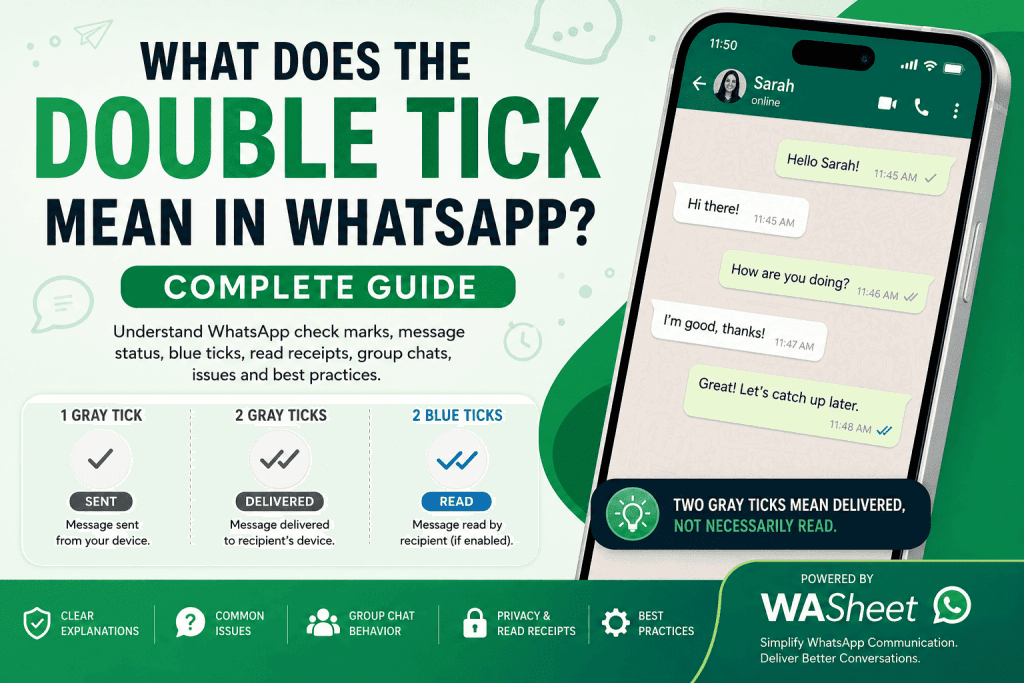
WhatsApp uses check marks to communicate the status of messages you send. These indicators appear next to your messages and provide a quick way to understand whether a message has been sent, delivered, or read.
The three most important WhatsApp check marks are:
| WhatsApp Tick | Status | Meaning |
|---|---|---|
| ✓ One gray tick | Sent | The message has been sent from your device and reached WhatsApp’s system, but delivery to the recipient’s device has not been confirmed. |
| ✓✓ Two gray ticks | Delivered | The message has been delivered to the recipient’s device. |
| ✓✓ Two blue ticks | Read | The message has been read when applicable read-receipt settings allow the indicator to appear. |
Understanding this simple system makes it much easier to interpret WhatsApp messages.
For example, if you send “Hello” and immediately see two gray ticks, you know that the message has been delivered. However, you cannot automatically assume that the person has opened the chat.
If those two gray ticks later become blue, WhatsApp is indicating that the message has been read.
What Does the Double Tick Mean in WhatsApp?
The double tick in WhatsApp usually refers to the two gray check marks that appear after a message has been delivered.
When you see two gray ticks, it means your message has reached the recipient’s device. It does not necessarily mean that the person has opened the conversation or read the message.
This distinction is important.
One gray tick
Your message has been sent, but delivery has not yet been confirmed.
Two gray ticks
Your message has been delivered to the recipient’s device.
Two blue ticks
The message has been read when read receipts are applicable.
So, if you are searching for the double check mark meaning on WhatsApp, the short answer is:
Two gray ticks mean delivered, not necessarily read.
This is one of the most common misunderstandings surrounding WhatsApp message status.
Double Tick Meaning in WhatsApp Explained
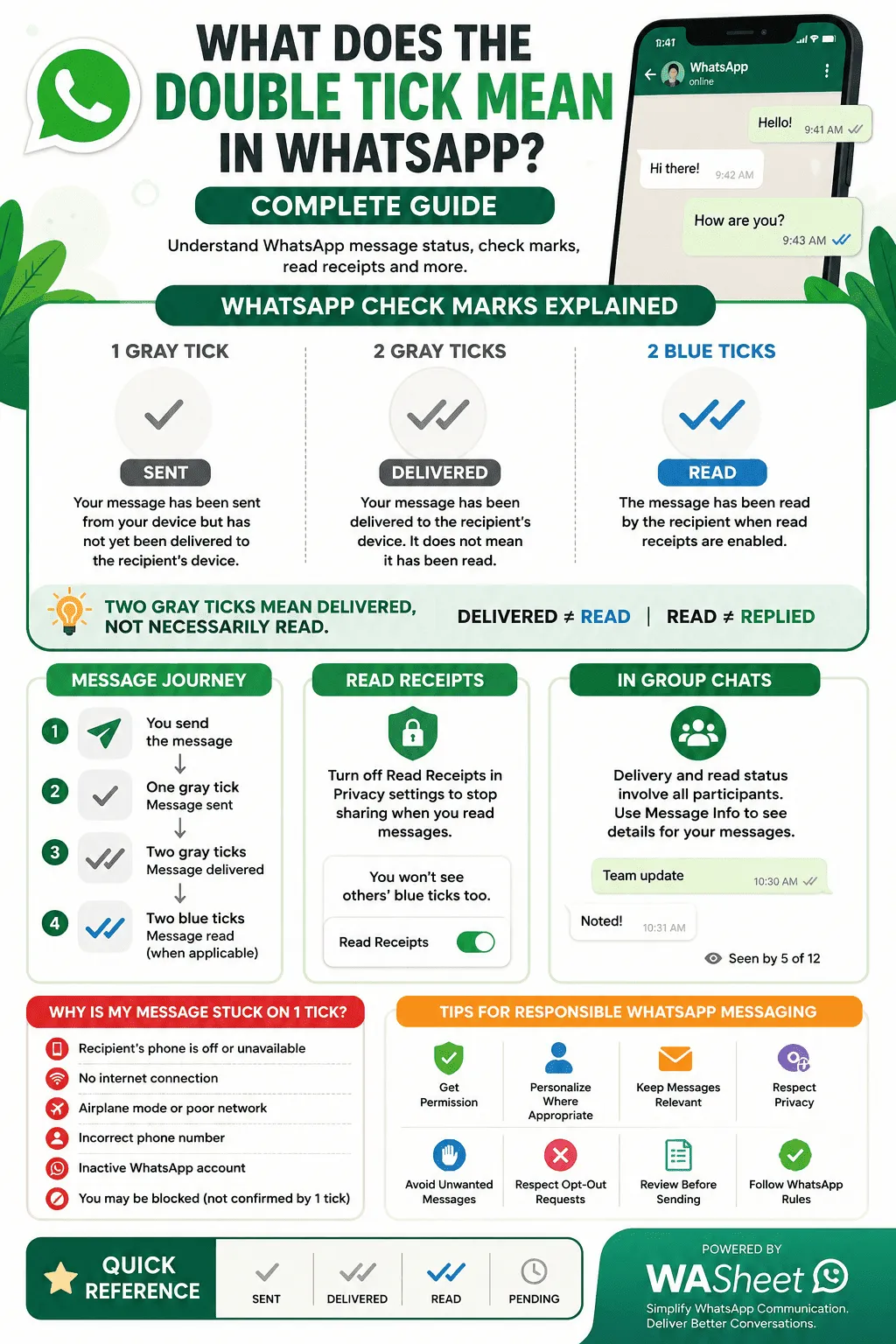
Let’s look at the message journey step by step.
1. You Send the Message
You type a message and tap the send button.
WhatsApp begins processing and sending the message.
2. One Gray Tick Appears
A single gray check mark indicates that the message has been sent from your side, but delivery to the recipient’s device has not yet been confirmed.
At this point, several things could be happening.
The recipient may:
- Have their phone turned off
- Have no internet connection
- Be experiencing connectivity problems
- Be temporarily unavailable
- Have another delivery-related issue
A single tick by itself does not prove that you have been blocked.
3. Two Gray Ticks Appear
When the message is delivered to the recipient’s device, the single tick becomes two gray ticks.
This is the double tick in WhatsApp.
It means:
Message delivered.
It does not necessarily mean:
Message read.
That difference is essential when interpreting WhatsApp message status.
4. Two Blue Ticks Appear
When the recipient reads the message and the applicable read-receipt settings allow it, the two gray ticks become two blue ticks.
This indicates that WhatsApp has registered the message as read.
WhatsApp Check Marks at a Glance
Here is the easiest way to remember what each WhatsApp tick means:
| Tick Indicator | Meaning |
|---|---|
| One gray check | Message sent but not yet confirmed as delivered |
| Two gray checks | Message delivered |
| Two blue checks | Message read |
| Clock/pending indicator | Message has not successfully been sent yet |
The important distinction is between delivery status and read status.
A delivered message can remain unread.
Why Do I See Two Gray Ticks but No Blue Ticks?
This is one of the most common WhatsApp questions.
If you see two gray ticks but they do not turn blue, it generally means the message has been delivered but WhatsApp has not shown a read receipt.
Possible explanations include:
The recipient has not opened the conversation
The message may have reached their phone, but they have not opened the chat.
Read receipts are disabled
WhatsApp privacy settings can affect whether read receipts appear in individual conversations.
The recipient has not interacted with the message yet
Delivery and reading are separate events. A message can remain delivered without becoming read.
The chat has different receipt behavior
Group chats and certain message types can behave differently from standard one-to-one text conversations.
Therefore, two gray ticks do not mean that someone ignored you. They only tell you that the message was delivered.
How to Know If Someone Has Read Your WhatsApp Message
The easiest indicator is the color of the check marks.
When applicable:
Two gray ticks = delivered
Two blue ticks = read
WhatsApp also provides message information that can help you understand delivery and read status for messages you send.
To check message information:
- Open the WhatsApp conversation.
- Find the message you sent.
- Tap and hold the message.
- Select the message information option.
- Review the available delivery and read details.
Depending on the conversation and privacy settings, you may be able to see when a message was delivered and when it was read.
This is particularly useful when you need more information than the check marks provide.
WhatsApp Message Info: Delivered vs. Read
The message information screen helps separate different stages of a message.
| Status | Indicator | Meaning |
|---|---|---|
| Sent | One gray tick | Message has been sent |
| Delivered | Two gray ticks | Message has reached the recipient’s device |
| Read | Two blue ticks | Message has been read when read receipts apply |
This distinction is useful for both personal and business conversations.
For example, imagine you send a customer an order update.
If you see two gray ticks, the message was delivered.
If you later see two blue ticks, WhatsApp has registered that the message was read.
However, neither status guarantees that the customer will reply.
Double Ticks in WhatsApp Group Chats
WhatsApp group conversations can behave differently from one-to-one chats.
When you send a message to a group, delivery and read status involve multiple participants.
A message may remain gray while one or more members have not completed the relevant delivery or read stage.
Once the applicable group read status is satisfied, blue check marks can appear.
You can also use the message information feature for messages you have sent to see additional information about participants where WhatsApp makes that information available.
Why group chats are different
A one-to-one conversation has one sender and one recipient.
A group conversation may contain many recipients.
Therefore, message delivery and read status have to account for multiple people.
This is especially important when using WhatsApp for:
- Team communication
- Customer groups
- Event coordination
- Community management
- Business announcements
- Project updates
Do not assume that a gray group-chat message means nobody has seen it. Use the available message information to understand the status more accurately.
WhatsApp Read Receipts Explained
WhatsApp read receipts are privacy features that indicate when messages have been read.
For many individual conversations, disabling read receipts changes whether blue ticks appear for read messages.
This creates a two-way privacy trade-off: when read receipts are disabled, you generally lose the ability to see other people’s read receipts in individual chats as well.
This is why you might send a message, see two gray ticks, and never see the blue ticks even if the recipient has actually read it.
How to Turn Off WhatsApp Read Receipts
If you want more control over your WhatsApp privacy, you can manage the Read Receipts setting from WhatsApp’s privacy controls.
The exact menu labels can vary depending on your WhatsApp version and device, but the general process is:
- Open WhatsApp.
- Open Settings.
- Select Privacy.
- Find Read Receipts.
- Turn the setting off.
When read receipts are disabled, blue read indicators in supported individual conversations will no longer work in the same way.
Remember that read receipts are only one part of WhatsApp’s broader privacy system. Settings for last seen, online status, profile information, status updates, and other privacy controls are managed separately.
Can You Read a WhatsApp Message Without Blue Ticks?
If your goal is to protect your privacy, WhatsApp provides built-in options that reduce the visibility of your read status.
One common option is disabling read receipts.
You can also sometimes read message previews from notifications without opening the conversation directly. However, notification behavior depends on your phone and settings, and it may not display an entire long message.
Another important point is that different WhatsApp message types and group conversations may not follow exactly the same behavior as ordinary one-to-one text messages.
For this reason, there is no universal trick that guarantees that every WhatsApp interaction will remain completely invisible to the sender.
Why Is My WhatsApp Message Stuck on One Gray Tick?
If your message remains on one gray tick for a long time, the message has not reached the recipient’s device according to WhatsApp’s delivery indicator.
There are several possible explanations.
1. The Recipient’s Phone Is Off
If the recipient’s phone is switched off or unavailable, delivery may be delayed.
2. No Internet Connection
The recipient may not currently have a working internet connection.
3. Airplane Mode
Airplane mode or another connectivity restriction can prevent WhatsApp from receiving the message.
4. Temporary Network Problems
Poor connectivity can delay message delivery.
5. Incorrect Phone Number
If the contact information is incorrect, your message may not reach the intended person.
6. WhatsApp Account Availability
The recipient may no longer be using the WhatsApp account associated with that number.
7. Blocking
Blocking can also affect message delivery, but one gray tick alone is not enough to prove that someone has blocked you.
Several different situations can produce similar symptoms.
Does One Gray Tick Mean Someone Blocked You?
No.
A single gray tick can be one sign that makes people wonder whether they have been blocked, but it is not definitive proof.
Other factors may produce the same result.
For example:
- The recipient’s phone may be switched off.
- Their internet connection may be unavailable.
- Their device may be experiencing connectivity problems.
- The number may be incorrect.
- Their WhatsApp account may no longer be active.
- Other account or delivery conditions may apply.
Therefore, avoid assuming that you have been blocked based solely on a single WhatsApp tick.
WhatsApp Double Tick Not Showing: Common Problems
If your WhatsApp message is not progressing from one tick to two, use this troubleshooting checklist.
Check the phone number
Make sure the contact information is correct.
Check your internet connection
A weak connection on your side can prevent messages from being sent properly.
Wait and try again
Temporary connectivity problems can resolve themselves.
Check whether the recipient uses WhatsApp
An inactive or incorrect number cannot receive your WhatsApp message normally.
Update WhatsApp
Using an outdated application can sometimes cause unexpected behavior or compatibility problems.
Restart your connection
Switching your mobile data or Wi-Fi connection off and back on may help with temporary network issues.
Avoid jumping to conclusions
A missing double tick does not automatically indicate blocking.
WhatsApp Ticks and Washeet
Washeet can be useful when you manage WhatsApp messaging from a business or productivity workflow.
When messages are sent through a WhatsApp-based workflow, understanding the standard WhatsApp tick system remains important.
The basic concept is straightforward:
- One gray tick indicates that the message has been sent but delivery has not yet been confirmed.
- Two gray ticks indicate delivery.
- Two blue ticks indicate a read status when applicable.
- Message-level status can help you understand how individual messages are progressing.
The advantage of understanding these indicators is that you can distinguish sending, delivery, and reading rather than treating them as the same event.
Sending Personalized WhatsApp Messages with WASheet
For businesses, personalization can make WhatsApp communication more relevant.
Instead of sending the exact same generic message to every contact, businesses may personalize communication with information such as:
- Customer names
- Order details
- Appointment information
- Product information
- Payment reminders
- Delivery updates
- Event details
- Support information
For example:
Generic message:
“Your order has been shipped.”
Personalized message:
“Hi Sarah, your order #4821 has been shipped and is on its way.”
Personalized communication can make a message feel more relevant while still allowing businesses to manage communications efficiently.
The WhatsApp tick system remains useful because each message can have its own delivery and read status.

Understanding Message Delivery When Using WASheet
When sending multiple WhatsApp messages through a business workflow, it is important to understand that message volume does not change what the basic WhatsApp check marks represent.
The status of each message should still be interpreted individually.
| Message Status | WhatsApp Indicator | Meaning |
|---|---|---|
| Sent | One gray tick | Message has been sent |
| Delivered | Two gray ticks | Message has reached the recipient’s device |
| Read | Two blue ticks | Message has been read when applicable |
| Pending | Clock/pending indicator | Message has not been successfully sent yet |
This distinction can help you identify delivery issues without confusing them with customer engagement.
For example, a message with two gray ticks was delivered, but that does not tell you whether the customer will respond.
Likewise, a blue tick does not guarantee a purchase, reply, or conversion.
Delivery Status vs. Customer Engagement
This is especially important for businesses using WhatsApp.
A WhatsApp delivery indicator tells you about message status, not business results.
Consider these four stages:
Sent
The message has been sent.
Delivered
The message has reached the recipient’s device.
Read
WhatsApp has registered the message as read where applicable.
Responded
The recipient actually replied.
These are four different events.
A customer can receive a message without reading it.
They can read it without responding.
They can respond without making a purchase.
Therefore, WhatsApp ticks should be treated as communication indicators not complete customer-engagement metrics.
Also Read: How to Export WhatsApp Group Contacts
Common Reasons WhatsApp Messages Are Not Delivered
When managing WhatsApp communication, undelivered messages can result from several issues.
Poor Internet Connection
Connectivity problems can delay delivery.
Recipient Offline
The recipient may not currently have an active connection.
Incorrect Contact Information
An incorrect number can prevent delivery.
Inactive WhatsApp Account
The recipient may not have an active WhatsApp account associated with the number.
Temporary Technical Issues
Temporary service or device problems can affect message delivery.
Privacy or Account Restrictions
Certain account circumstances can also affect what information you can see.
When troubleshooting, look at the overall situation instead of relying on one indicator alone.
What If WhatsApp Shows Two Gray Ticks for a Long Time?
Two gray ticks mean the message has been delivered.
If they remain gray for hours or days, there are several possible explanations.
The recipient may simply not have opened the message.
They may have read receipts disabled.
They may have seen the message through another notification or device context without generating the read indicator you expected.
The important point is that two gray ticks do not tell you why a person has not responded.
They only provide information about message delivery.
What If WhatsApp Blue Ticks Do Not Appear?
If you expect blue ticks but only see two gray ticks, consider the following:
- The recipient may not have opened the message.
- Read receipts may be disabled.
- The conversation may be a group chat with different read-status behavior.
- The message type may have different receipt rules.
- WhatsApp may not currently be displaying the expected status because of an app or connectivity issue.
Do not interpret missing blue ticks as proof that a person deliberately ignored your message.
WhatsApp Tick Marks and Privacy
WhatsApp check marks are closely connected to privacy.
Some people want to know when their messages are read.
Others prefer not to reveal when they have opened messages.
WhatsApp provides privacy controls that allow users to manage aspects of their read-receipt behavior.
However, privacy settings can have trade-offs.
For example, disabling read receipts can also mean that you cannot see read receipts from other people in supported individual conversations.
This gives users greater privacy but reduces visibility into message-read status.
WhatsApp Message Status: Quick Reference
| Status | What You See | What It Means |
|---|---|---|
| Not sent | Clock/pending icon | Message has not successfully left your device |
| Sent | One gray tick | Message has been sent |
| Delivered | Two gray ticks | Message has been delivered |
| Read | Two blue ticks | Message has been read where applicable |
Remember:
Sent ≠ Delivered
Delivered ≠ Read
Read ≠ Replied
These distinctions are among the most useful things to understand about WhatsApp messaging.
Responsible WhatsApp Messaging with WASheet
If you use WASheet or another tool for business communication, sending messages responsibly is just as important as understanding delivery status.
Good WhatsApp bulk messaging practices include:
Get Permission
Only contact people who have a legitimate reason to receive your messages and have provided appropriate consent where required.
Avoid Unwanted Messages
Repeated unsolicited messages can damage trust and may result in complaints or account restrictions.
Respect Opt-Out Requests
If someone asks you to stop messaging them, honor the request promptly.
Keep Your Messages Relevant
Send information that is useful to the recipient instead of unnecessary promotional content.
Personalize Where Appropriate
Relevant personalization can make business communication clearer and more useful.
Review Messages Before Sending
Check names, numbers, links, prices, dates, and other important information before sending.
Follow WhatsApp Rules
Always use WhatsApp in accordance with applicable policies, terms, and responsible messaging practices.
Why Understanding WhatsApp Ticks Matters for Businesses
For personal conversations, WhatsApp check marks answer a simple question:
Did my message get delivered or read?
For businesses, the same information can provide useful operational context.
For example, a business may use message status to understand whether:
- An appointment reminder was delivered
- A customer update reached the recipient
- A support message was read
- An order notification was delivered
- A follow-up message has been opened
However, businesses should avoid treating a tick as a complete measurement of customer engagement.
A delivery indicator tells you about the message.
It does not tell you what the recipient thought about it.
WhatsApp Double Tick: Important Things to Remember
Here are the most important points from this guide:
- One gray tick means the message has been sent but delivery has not been confirmed.
- Two gray ticks mean the message has been delivered.
- Two blue ticks indicate that the message has been read when applicable.
- Two gray ticks do not necessarily mean the recipient has read the message.
- One gray tick does not automatically mean you have been blocked.
- Read receipts can affect whether blue ticks appear in individual conversations.
- Group chats can have different read-status behavior.
- Message Info can provide additional delivery and read information.
- WASheet can help businesses manage WhatsApp communication while relying on WhatsApp’s standard message-status indicators.
- Delivery, reading, and replying are separate stages of communication.
- Responsible WhatsApp messaging requires respect for privacy, consent, and applicable platform rules.
Frequently Asked Questions About WhatsApp Double Ticks
What does a double tick mean in WhatsApp?
Two gray ticks mean that your WhatsApp message has been delivered to the recipient’s device. They do not necessarily mean that the recipient has read the message.
What does two blue ticks mean on WhatsApp?
Two blue ticks generally indicate that your message has been read when read receipts apply.
Why do I have two gray ticks but no blue ticks?
The recipient may not have opened the conversation or read receipts may not be available for that conversation. Group chats and certain message types can also behave differently.
Do two gray ticks mean someone is online?
No. Two gray ticks indicate message delivery. They do not tell you whether the person is currently online.
Does one gray tick mean I am blocked?
Not necessarily. One gray tick can happen because the recipient is offline, has no internet connection, has an unavailable device, the number is incorrect, or for other reasons. A single tick alone cannot confirm blocking.
Can I turn off blue ticks on WhatsApp?
You can manage the Read Receipts privacy setting. When read receipts are disabled, blue read indicators are affected in supported individual conversations, and you generally cannot see other people’s read receipts there either.
Do WhatsApp ticks work differently in group chats?
Yes. Group conversations involve multiple recipients, so delivery and read status can behave differently from one-to-one chats.
Can I check when someone received my WhatsApp message?
For messages you send, WhatsApp’s message information feature can provide available delivery information and, where applicable, read information.
Can I know exactly when someone read my WhatsApp message?
WhatsApp can show read information for your sent messages when the relevant read status is available. Privacy settings and conversation type can affect what information is shown.
Why is my WhatsApp message stuck on one tick?
A message can remain on one gray tick when delivery to the recipient’s device has not been confirmed. Possible reasons include connectivity problems, an unavailable device, an incorrect number, or other account and delivery conditions.
Does a blue tick mean the person replied?
No. A blue tick indicates a read status, not a response. Someone can read your message without replying.
Does delivered mean read on WhatsApp?
No. Delivered and read are separate statuses. Two gray ticks mean delivered, while two blue ticks indicate read status when applicable.
How does WASheet relate to WhatsApp ticks?
When using WASheet for WhatsApp messaging workflows, understanding the standard WhatsApp check-mark system helps you distinguish sent, delivered, and read message statuses. The meaning of the WhatsApp indicators themselves does not change simply because a business is managing messages through a workflow.
Can I use WhatsApp ticks to measure customer engagement?
Ticks can provide useful delivery and read-status information, but they are not a complete engagement metric. A customer may receive or read a message without replying, clicking a link, or purchasing anything.
Final Thoughts
The double tick in WhatsApp is one of the simplest but most frequently misunderstood WhatsApp features.
The basic rule is easy to remember:
One gray tick = sent
Two gray ticks = delivered
Two blue ticks = read, when applicable
The key is not to confuse delivery with reading. Two gray ticks tell you that the message reached the recipient’s device, but they do not guarantee that the person opened the conversation or saw the content.
For businesses using WhatsApp, this distinction becomes even more important. Tools and workflows such as WASheet can help streamline WhatsApp communication, but the underlying message-status indicators should still be interpreted correctly.
Whether you are checking on a personal message, following up with a customer, sending an appointment reminder, or managing personalized WhatsApp communication, understanding check marks gives you a clearer picture of what happened to your message.
And remember: a WhatsApp tick can tell you the status of a message, but it cannot tell you what the recipient thinks, whether they agree with you, or whether they will respond.