
In this guide, you’ll learn exactly how to turn off WhatsApp read receipts, what the grey and blue ticks mean, how read receipts work in group chats and voice messages, and what limitations you should know about before changing the setting.
Want to read a WhatsApp message without showing the blue ticks? WhatsApp lets you turn off read receipts, giving you more control over when other people know you have opened their messages.
When read receipts are disabled, people in individual chats generally won’t see the blue checkmarks when you read their messages. However, the setting works both ways: you also won’t be able to see read receipts from other people in individual conversations.
Whether you’re using Android, iPhone, WhatsApp Web, or WhatsApp Desktop, changing this privacy setting only takes a few moments.
Key Takeaways
- You can turn off WhatsApp read receipts through the app’s Privacy settings.
- The setting applies to individual chats rather than letting you choose specific contacts.
- When read receipts are disabled, you generally won’t see blue ticks for messages you send in individual chats either.
- WhatsApp group chats have different read-receipt behavior.
- Voice messages have separate read-status behavior and can still show that they have been played.
- Turning off read receipts does not automatically hide your last seen or online status.
- WhatsApp Status privacy is also connected to read receipts.
- Disabling read receipts can give you more privacy and reduce pressure to respond immediately.
What Are WhatsApp Read Receipts?
WhatsApp read receipts are notifications represented by check marks that indicate the delivery and reading status of a message.
They answer a simple question: Has the recipient actually opened and read my WhatsApp message?
The familiar blue ticks are useful when you’re waiting for an important response, but they can also create pressure to reply immediately. If you prefer more control over your messaging activity, WhatsApp provides a privacy setting that lets you disable read receipts.
Once disabled, your contacts generally won’t receive the blue-tick confirmation when you read their individual messages.
The trade-off is important: you also lose the ability to see when other people have read your messages in individual chats.
What Do the WhatsApp Check Marks Mean?
Before changing your privacy settings, it helps to understand what each WhatsApp check mark represents.
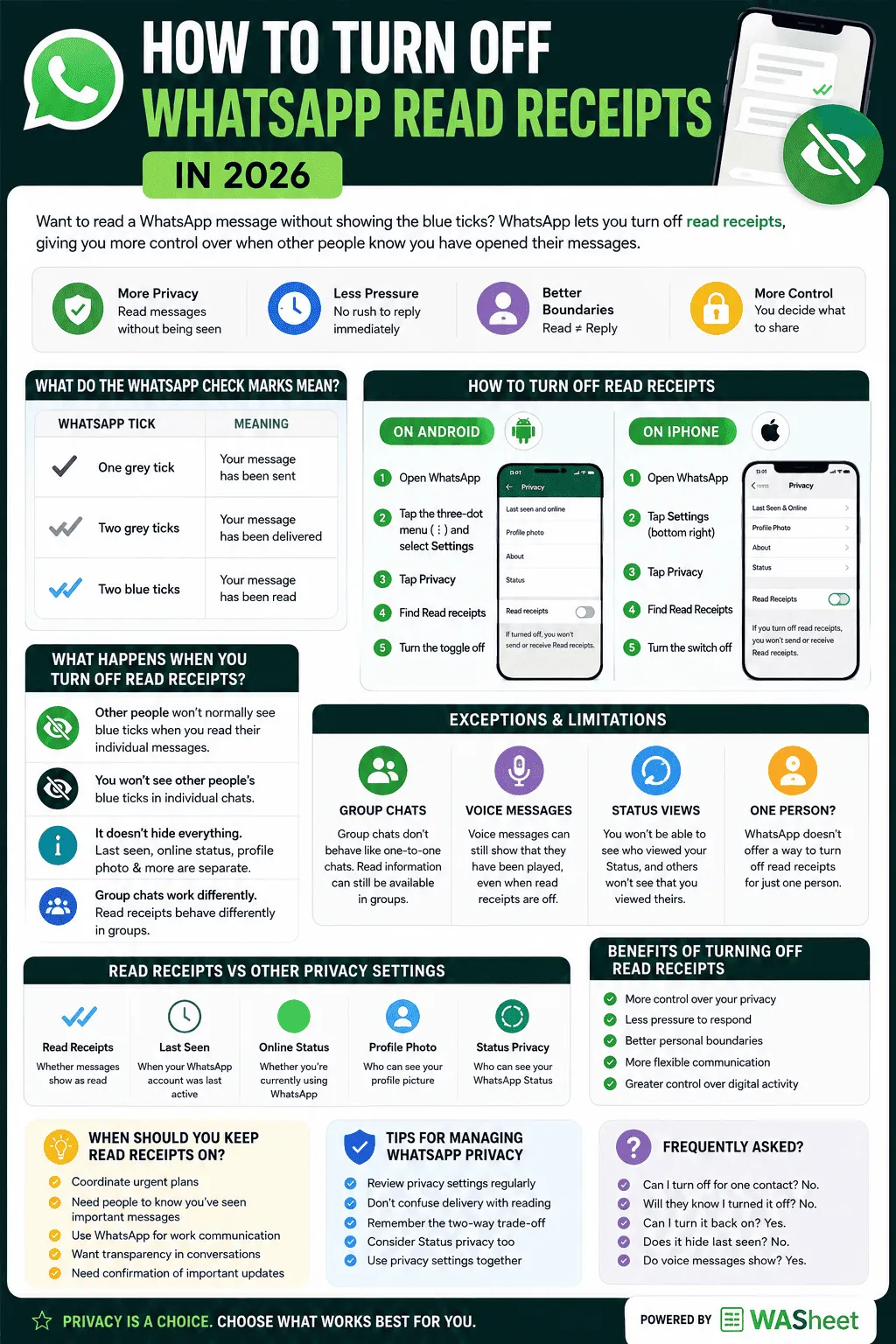
| WhatsApp Tick | Meaning |
|---|---|
| One grey tick | Your message has been sent |
| Two grey ticks | Your message has been delivered |
| Two blue ticks | Your message has been read |
One Grey Tick
A single grey checkmark means the message has been successfully sent from your device.
Two Grey Ticks
Two grey checkmarks indicate that the message has been delivered to the recipient’s device.
Delivery doesn’t necessarily mean the person has opened the conversation.
Two Blue Ticks
Two blue checkmarks indicate that the message has been read in a supported individual conversation.
This is what most people mean when they talk about WhatsApp blue ticks or WhatsApp read receipts.
How to Turn Off WhatsApp Read Receipts on Android
If you’re using WhatsApp on an Android phone, you can disable read receipts directly from the privacy settings.
Step 1: Open WhatsApp
Launch the WhatsApp app on your Android smartphone.
Step 2: Open Settings
Tap the three-dot menu in the upper-right corner and select Settings.
Step 3: Open Privacy
Tap Privacy to access WhatsApp’s privacy controls.
Step 4: Find Read Receipts
Scroll through the privacy options until you find Read receipts.
Step 5: Turn Read Receipts Off
Switch the Read receipts toggle off.
That’s it. The change takes effect without requiring you to restart WhatsApp.
What Changes After You Disable It?
In individual chats, other people generally won’t see blue ticks when you read their messages.
However, you’ll also stop seeing read receipts from other people in individual chats.
Important: Turning off read receipts isn’t the same as hiding your online status or last seen information. Those privacy settings can be managed separately.
How to Turn Off WhatsApp Read Receipts on iPhone
The process is similarly straightforward on an iPhone.
Step 1: Open WhatsApp
Open WhatsApp on your iPhone.
Step 2: Tap Settings
Select Settings from the bottom navigation menu.
Step 3: Select Privacy
Tap Privacy to open your WhatsApp privacy settings.
Step 4: Locate Read Receipts
Find the Read Receipts option.
Step 5: Disable the Setting
Turn the Read Receipts switch off.
Your WhatsApp read-receipt preference is now disabled.
If you change your mind later, you can return to the same menu and enable the setting again.
Can You Turn Off Read Receipts on WhatsApp Web or Desktop?
WhatsApp Web and WhatsApp Desktop are designed to work with the privacy preferences associated with your WhatsApp account.
If you’re looking for a separate read receipts setting on WhatsApp Web, the available controls can vary with the current version of WhatsApp. The most reliable approach is to manage your read-receipt preference from the WhatsApp mobile app.
If you use WhatsApp on a computer frequently, make sure your browser or desktop application is updated so you have access to the latest privacy features.
What Happens When You Turn Off Read Receipts?
Disabling WhatsApp read receipts changes the way read information is displayed in individual conversations.
Here are the main consequences:
Other People Won’t Normally See Your Blue Ticks
When you read an individual message with read receipts disabled, the sender generally won’t receive the normal blue-tick confirmation.
You Won’t See Other People’s Blue Ticks
The setting is reciprocal. If you can’t show read receipts, you generally can’t use them to determine when another person has read your individual messages.
It Doesn’t Hide Everything
Turning off read receipts doesn’t automatically make your entire WhatsApp activity private.
Other information, such as your online status, last seen information, profile photo, and status privacy, is controlled through separate privacy settings.
Group Chats Work Differently
WhatsApp group conversations have their own read-receipt behavior, so disabling the individual-chat setting doesn’t mean all read information disappears from groups.
WhatsApp Read Receipt Exceptions and Limitations
Although disabling read receipts can improve privacy, there are important limitations.
Understanding these exceptions prevents confusion when a blue tick appears even though you’ve turned read receipts off.
Read Receipts in WhatsApp Group Chats
Group chats don’t behave exactly like one-to-one conversations.
WhatsApp handles message-read information differently in groups, and read information can still be available through message information.
If you’re managing a team, family group, event, or community conversation, don’t assume that disabling individual read receipts gives you the same level of visibility control inside group chats.
WhatsApp Voice Messages and Blue Ticks
Voice messages are another important exception.
WhatsApp treats voice-message playback differently from ordinary text-message read receipts. A voice message can show that it has been played even when regular read receipts are disabled.
So if your goal is to completely prevent another person from knowing that you’ve interacted with their message, remember that turning off read receipts doesn’t necessarily hide voice-message playback.
WhatsApp Status Views and Read Receipts
Read receipts also affect WhatsApp Status privacy.
When read receipts are disabled, you generally lose the ability to see who has viewed your Status, while other people won’t normally see that you’ve viewed theirs.
This creates another privacy trade-off:
More viewing privacy = less visibility into who viewed your own Status.
If you frequently use WhatsApp Status for personal updates, business promotion, or announcements, consider this before changing the setting.
Can You Turn Off Read Receipts for One Person?
WhatsApp doesn’t provide a standard option to disable read receipts for only one specific individual.
The read-receipt preference is a broader privacy setting rather than a per-contact switch.
For example, you can’t normally configure WhatsApp so that:
- Person A can see your blue ticks
- Person B cannot see your blue ticks
- Person C can see them again
Instead, you manage read receipts through the overall privacy setting.
If you need different privacy levels for different people, other WhatsApp privacy controls may provide more flexibility, but read receipts themselves aren’t designed as a per-contact feature.
Read Receipts vs Last Seen and Online Status
These features are related to WhatsApp privacy, but they aren’t the same thing.
| Feature | What It Controls |
|---|---|
| Read Receipts | Whether messages show as read |
| Last Seen | When your WhatsApp account was last active |
| Online Status | Whether you’re currently using WhatsApp |
| Profile Photo Privacy | Who can see your profile picture |
| Status Privacy | Who can see your WhatsApp Status |
Turning off read receipts does not automatically disable your last seen or online information.
If you’re trying to create a more private WhatsApp experience, review these settings separately.
Benefits of Turning Off WhatsApp Read Receipts
There are several reasons someone might choose to disable blue ticks.
1. More Control Over Your Privacy
Read receipts reveal that you’ve opened a message.
Turning them off gives you more control over whether contacts receive that confirmation.
You can check a message without immediately communicating that you’ve read it.
2. Less Pressure to Respond
A blue tick can create an expectation that a response should come immediately.
Disabling read receipts gives you more breathing room when you need time to think before replying.
This can be particularly useful when you’re busy with work, studying, traveling, or simply don’t have the time to continue a conversation.
3. Better Personal Boundaries
Not every message requires an immediate response.
Turning off read receipts can help establish healthier boundaries around messaging by separating reading a message from being ready to respond.
4. More Flexible Communication
You can check your messages when convenient instead of treating every blue tick as a commitment to respond.
This can make WhatsApp feel less demanding, particularly if you receive a large number of messages every day.
5. Greater Control Over Digital Activity
Privacy isn’t only about hiding sensitive information. It’s also about deciding how much of your everyday digital activity you want to share.
Read receipts are a small part of that broader control.
When Should You Keep Read Receipts On?
Turning off read receipts isn’t automatically better for everyone.
There are situations where read confirmations are useful.
Keep Them On If You:
- Frequently coordinate urgent plans through WhatsApp
- Need people to know you’ve seen important messages
- Use WhatsApp for work communication
- Want clearer communication with friends or family
- Prefer transparency in conversations
- Need confirmation that someone has received and read an important update
For example, if you’re coordinating a meeting, deadline, travel arrangement, or urgent task, read receipts can reduce unnecessary follow-up messages.
The best setting depends on how you use WhatsApp.
Tips for Managing WhatsApp Read Receipts
Review Your Privacy Settings Regularly
WhatsApp continues to introduce and modify privacy features. Check your privacy settings periodically so you understand what information you’re sharing.
Don’t Confuse Delivery With Reading
Two grey ticks mean a message has been delivered. They don’t necessarily mean the recipient has read it.
Two blue ticks indicate a read status in contexts where read receipts apply.
Remember the Two-Way Trade-Off
The biggest consideration is simple:
If you turn off read receipts, you also give up read-receipt visibility for your own messages in individual chats.
Consider Status Privacy Too
If you use WhatsApp Status regularly, remember that read-receipt settings can affect Status-view visibility.
Use Privacy Settings Together
For a more private WhatsApp setup, review read receipts alongside:
- Last seen
- Online status
- Profile photo
- About information
- Status visibility
- Group privacy
- Calls and other available privacy controls
Also Read: How to Lock a Chat on WhatsApp for Privacy
How WASheet Can Help With WhatsApp Communication
For businesses and teams that use WhatsApp as part of their communication workflow, privacy is only one part of managing conversations.
WASheet can complement a structured WhatsApp workflow by helping businesses organize and manage messaging activities more efficiently.
Instead of treating WhatsApp only as a personal chat application, businesses can use spreadsheet-based workflows to organize contacts, messages, campaigns, and communication tasks.
This can be particularly useful for teams handling:
- Customer communication
- Follow-ups
- Marketing messages
- Contact lists
- Business outreach
- Repetitive WhatsApp communication
- Spreadsheet-based messaging workflows
The important distinction is that WhatsApp read receipts control privacy around message-read status, while business messaging tools focus on organizing and managing communication.
Frequently Asked Questions
What happens if I turn off read receipts on WhatsApp?
People generally won’t see blue ticks when you read their individual messages. However, you also won’t see read receipts for messages you send in individual chats.
Can I turn off WhatsApp read receipts for one contact?
No. WhatsApp doesn’t normally provide a per-contact read-receipt switch. The setting applies more broadly to individual conversations.
Can someone tell if I read their WhatsApp message with read receipts off?
In a standard individual text conversation, they generally won’t receive the normal blue-tick read confirmation when read receipts are disabled. However, different WhatsApp features, such as group chats and voice messages, can behave differently.
Do two grey ticks mean someone read my message?
No. Two grey ticks mean the message has been delivered. Two blue ticks indicate that it has been read where read receipts apply.
Will I still see blue ticks if I turn off read receipts?
You generally won’t see read receipts in individual chats after disabling the feature. WhatsApp also has separate behavior for group conversations and voice messages.
Does turning off read receipts hide my last seen?
No. Read receipts and last seen are separate privacy controls. You can configure them independently.
Can I turn read receipts back on?
Yes. Return to WhatsApp’s privacy settings and enable Read Receipts again.
Do WhatsApp read receipts work differently in group chats?
Yes. Group chats use different read-status behavior from one-to-one conversations. Turning off individual read receipts doesn’t mean every read-status indicator disappears from groups.
Do voice messages show blue ticks when read receipts are off?
Voice messages have separate read-status behavior and can still indicate that the voice message has been played.
Can I read WhatsApp messages without showing blue ticks?
For ordinary individual text messages, disabling read receipts is the built-in WhatsApp privacy option designed to prevent the usual blue-tick read confirmation.
Does WhatsApp notify someone when I turn read receipts off?
WhatsApp doesn’t send a standard notification telling a contact that you’ve changed your read-receipt setting.
Final Thoughts
Turning off WhatsApp read receipts in 2026 is a simple way to gain more control over your messaging privacy.
The process is straightforward: open WhatsApp’s privacy settings, locate Read Receipts, and disable the option.
The main trade-off is that privacy works both ways. When you stop sharing your read status in individual chats, you also lose access to other people’s read receipts.
It’s also important to remember that group chats, voice messages, WhatsApp Status, last seen, and online status can follow different rules.
If your priority is privacy, disabling read receipts can be a useful setting. If you rely on read confirmations for work, urgent communication, or coordination, keeping them enabled may make more sense.
Ultimately, the right WhatsApp privacy configuration depends on how you communicate and how much activity you want to share with other people.