
This complete 2026 guide explains how to add contacts to a WhatsApp group in bulk using Excel or Google Sheets with WASheet, how to import or add bulk phone numbers to a WhatsApp group without manually saving every contact, and the easiest method businesses use to automate group imports through WhatsApp Web.
Adding dozens or even hundreds of members to a WhatsApp group manually can take hours. Whether you’re managing customers, students, employees, event attendees, or online communities, the default WhatsApp process quickly becomes inefficient.
The good news is that there is a much faster way.
In This Guide
You’ll learn:
- How to add multiple contacts to a WhatsApp group at once
- How to import phone numbers from Excel into a WhatsApp group
- How to add bulk contacts in WhatsApp group without saving number
- How to add bulk numbers from Google Sheets into a WhatsApp group
- Whether it’s possible to add contacts without saving them first
- Best practices to avoid common errors
- Why WASheet is one of the best WhatsApp group import tools in 2026
Learn from the below youtube video that How to Add Bulk Phone Numbers to WhatsApp Group from Excel Sheet:
Can You Add Multiple Contacts to a WhatsApp Group at Once?
The short answer is No.
WhatsApp currently does not provide a built-in feature that allows users to upload an Excel spreadsheet or CSV file and instantly add every phone number to a group.
By default, WhatsApp only lets you:
- Add participants individually
- Invite people using a group invitation link
- Share the invite QR code
- Add contacts already saved on your device
If you’re managing large groups, this process quickly becomes repetitive and time-consuming.
This is why many businesses, schools, agencies, and community managers rely on automation tools that simplify bulk group imports.
Why Businesses Use WASheet for Bulk WhatsApp Group Imports
If you’re looking for the easiest and most reliable way to import hundreds of contacts into a WhatsApp group, WASheet is one of the most complete solutions available in 2026.
Instead of manually adding every participant, WASheet allows you to import contacts directly from Excel or Google Sheets while working inside WhatsApp Web.
It is designed for users who regularly manage:
- Customer communities
- School or university groups
- Sales teams
- Company departments
- Event registrations
- Training batches
- Membership organizations
- Marketing campaigns
Unlike many complicated solutions, WASheet works through WhatsApp Web and does not require technical knowledge or API integration.
Key Features of WASheet
WASheet includes everything needed for professional WhatsApp group management.
Import Contacts from Excel
Upload Excel (.xlsx) files and add hundreds of contacts without manually entering phone numbers.
Import Members from Google Sheets
Export your Google Sheet as an Excel file and import it directly into WhatsApp.
Bulk Add Group Participants
Automatically process large contact lists while significantly reducing manual work.
Verify WhatsApp Numbers
Before importing, you can check whether uploaded numbers are registered on WhatsApp, helping reduce failed additions.
No Need to Save Every Contact
Manage temporary campaigns and customer databases without cluttering your phone’s address book.
CSV Import Results
Receive a downloadable report showing:
- Successfully processed numbers
- Invalid phone numbers
- Failed imports
- Processing status
Works with WhatsApp Web
Everything is handled through the familiar WhatsApp Web interface without requiring API access or advanced setup.
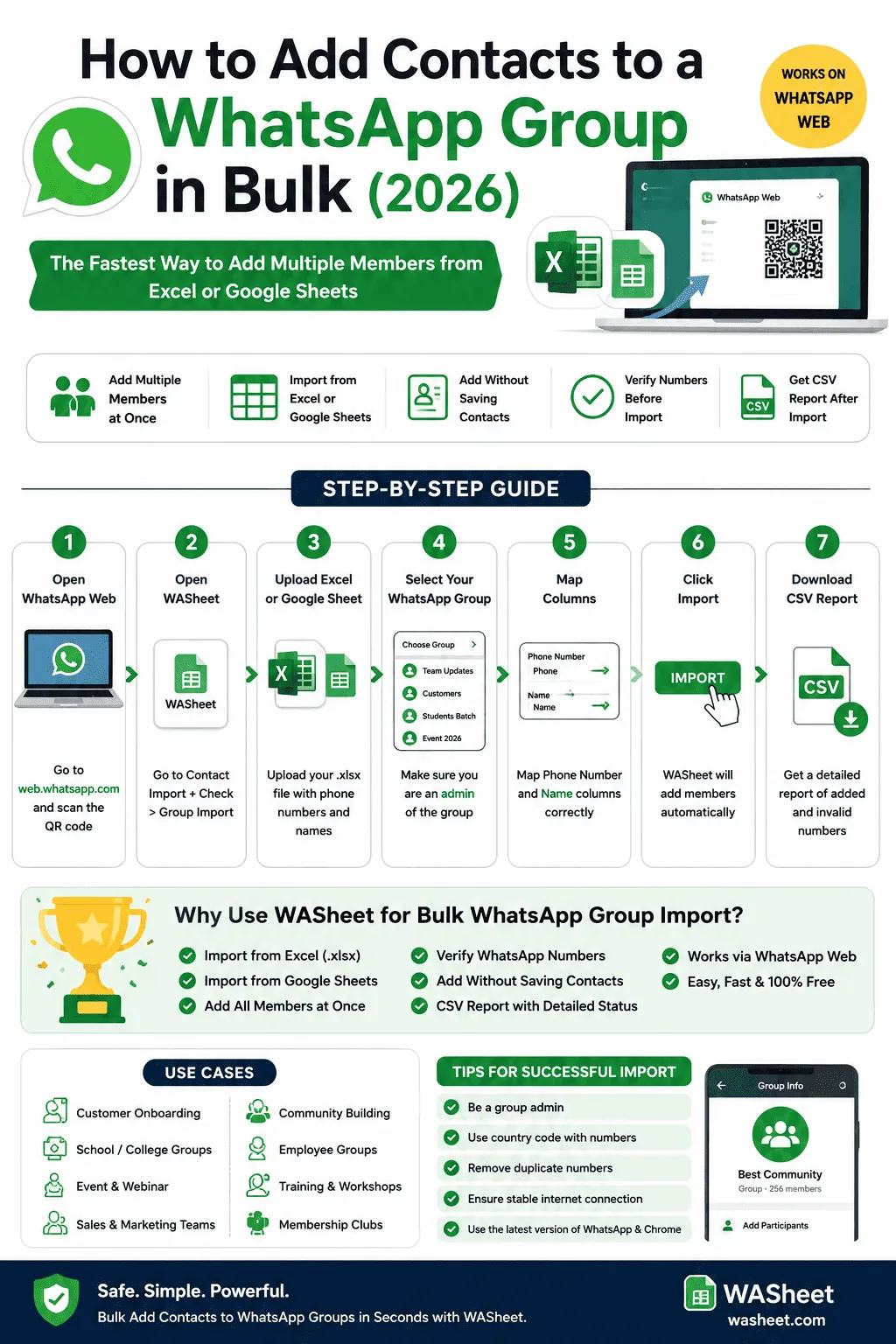
How to Add Contacts to a WhatsApp Group in Bulk from Excel through WASheet
Follow these steps to import contacts quickly.
Step 1: Open WhatsApp Web
Sign in to WhatsApp Web by scanning the QR code using your mobile phone.
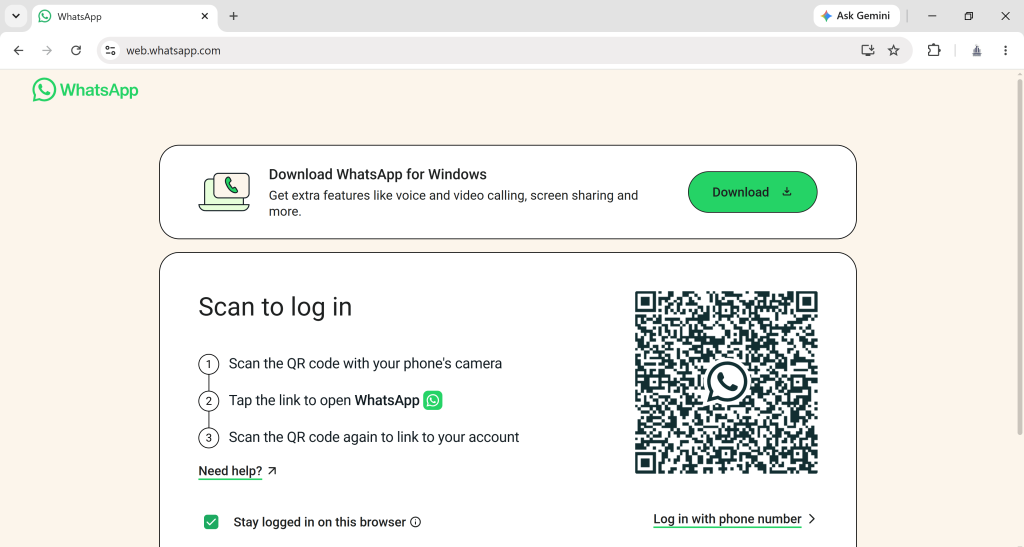
Wait until all chats finish syncing.
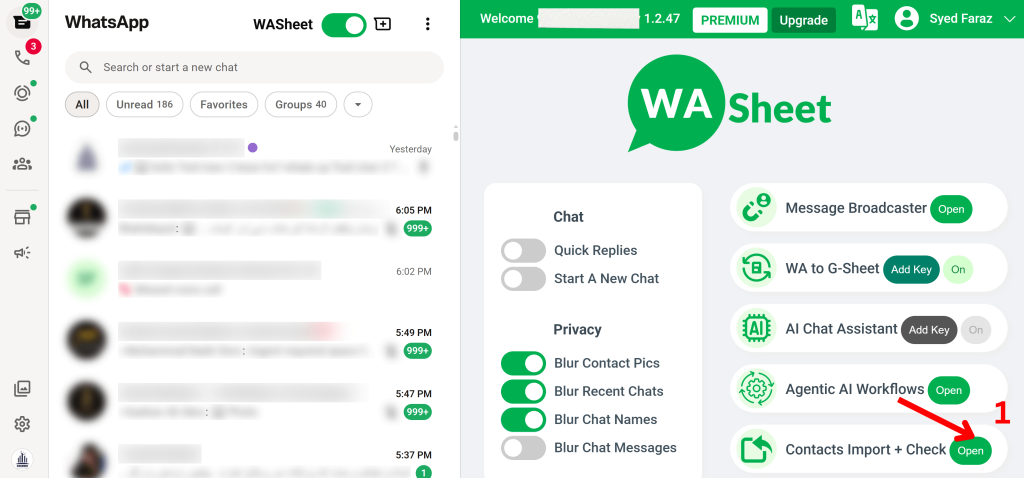
Step 2: Install and Launch WASheet
Install the WASheet extension from WASheet.com.
Navigate to:
Contact Import + Check → Group Import
This section is specifically designed for importing members into WhatsApp groups.
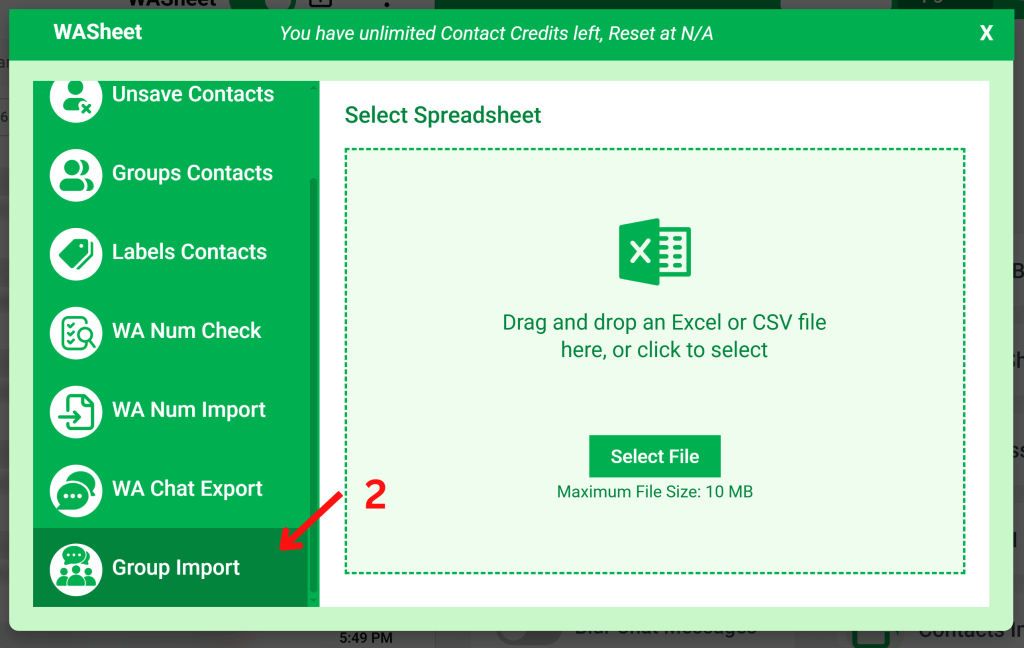
Step 3: Upload Your Excel File
Prepare an Excel spreadsheet containing your contacts.
Your spreadsheet should ideally include:
| Column | Required |
|---|---|
| Phone Number | ✅ Yes |
| Name | Optional but recommended |
Supported file format:
- .xlsx
Using proper formatting helps avoid processing errors.
Step 4: Choose Your WhatsApp Group
Select the destination group where members should be added.
Important: You must be a group administrator.
WhatsApp prevents non-admin users from adding participants.
Step 5: Match Spreadsheet Columns
Map your spreadsheet columns correctly.
Typically you’ll assign:
- Phone Number column
- Contact Name column (optional)
Correct mapping ensures accurate imports.
Step 6: Start the Import
Click Import.
WASheet will begin processing contacts and adding participants using WhatsApp Web.
The tool automatically handles the import process while displaying progress.
Step 7: Download the Import Report
After processing finishes, download the CSV report.
The report contains useful information including:
- Successfully added contacts
- Invalid numbers
- Processing failures
- Overall import summary
This makes it easy to review results after every import.
How to Add WhatsApp Group Members from Google Sheets
Many businesses maintain customer databases inside Google Sheets.
Importing them is straightforward.
Simply:
- Open your Google Sheet.
- Select File → Download → Microsoft Excel (.xlsx).
- Open WASheet.
- Upload the downloaded Excel file.
- Choose your WhatsApp group.
- Start the import.
No copy-pasting is required.
Can You Add Contacts Without Saving Them?
Yes.
One of the biggest advantages of WASheet is that it helps streamline group imports without forcing you to manually organize every number into your phone contacts first.
This is especially useful for:
- Temporary campaigns
- Event attendees
- Lead databases
- Customer onboarding
- Business outreach
Your personal contact list remains organized while your group management workflow becomes much faster.
Best Practices Before Importing Contacts
To improve your success rate, follow these recommendations:
- Ensure you’re the WhatsApp group administrator.
- Update WhatsApp to the latest version.
- Use the latest version of Google Chrome.
- Keep your internet connection stable.
- Include complete international country codes.
- Remove duplicate phone numbers.
- Verify uploaded numbers before importing.
- Respect WhatsApp’s participant limits and policies.
Common Use Cases
Thousands of professionals use bulk WhatsApp group importing for:
- Customer onboarding
- Online course enrollment
- School classes
- University batches
- Company teams
- Employee announcements
- Real estate client groups
- Healthcare communities
- Religious organizations
- Webinar attendees
- Conference participants
- Volunteer coordination
- Membership clubs
- Marketing campaigns
Frequently Asked Questions
How do I add multiple contacts to a WhatsApp group at once?
WhatsApp does not provide a native bulk import feature. A tool like WASheet lets you import contacts from Excel or Google Sheets into your WhatsApp group much more efficiently.
Can I create a new WhatsApp group directly from Excel?
Not entirely, WhatsApp requires a group to be created first before members can be added, and there’s no native way to generate a brand-new group straight from a spreadsheet. The practical workflow is: create the empty group manually inside WhatsApp (name it, set the icon), then use WASheet’s Group Import feature to bulk-add every contact from your Excel file in one go. This still saves hours compared to adding participants one by one.
How do I create a WhatsApp group without saving numbers, using an Excel file?
Create the group first with just yourself (or a co-admin) as a member, then open WASheet, go to Contact Import + Check → Group Import, upload your Excel file, and select the new group as the destination. WASheet adds every number from the sheet directly into the group without requiring you to save any of them to your phone’s contact list first.
Can I import phone numbers from Excel into WhatsApp groups?
Yes. Prepare your Excel spreadsheet, upload it through WASheet’s Group Import feature, select your destination group, and begin the import.
Can I import members from Google Sheets?
Yes. Download your Google Sheet as an Excel (.xlsx) file and upload it into WASheet.
Do I need to save every phone number first?
No. WASheet streamlines the import workflow so you don’t have to manually create hundreds of contacts before managing group participants.
Can I verify WhatsApp numbers before importing?
Yes. WASheet includes a Contact Import + Check feature that verifies whether uploaded phone numbers are registered on WhatsApp before processing.
Will I receive an import report?
Yes.
After the import completes, WASheet generates a CSV report showing processed contacts, successful additions, invalid numbers, and other useful status information.
Is WASheet suitable for businesses?
Absolutely.
Businesses, educational institutions, agencies, marketers, and community managers use WASheet to simplify large-scale WhatsApp group management while saving significant amounts of time.
Can I add multiple contacts to a WhatsApp group at the same time using the app?
WhatsApp lets you select several unsaved numbers manually when adding participants, but there is no native feature to upload a list and add bulk numbers to a WhatsApp group instantly. That’s why tools like WASheet exist to automate the process from Excel or Google Sheets.
What is the WhatsApp group member limit in 2026?
WhatsApp groups currently support up to 1,024 members. If you’re adding bulk numbers to a WhatsApp group in batches, keep this limit in mind so imports don’t fail near the cap.
Can I add bulk numbers to a WhatsApp group using Google Contacts, without any tool?
Yes. You can import a CSV of numbers into Google Contacts, sync it to your phone, and then manually select the newly saved contacts inside your WhatsApp group. It works but is slower and more manual than using WASheet’s Group Import feature, especially for large lists.
Can I add people to a WhatsApp group with just a QR code or invite link instead of numbers?
Yes. Sharing the group’s invite link or QR code lets people join themselves without you adding their numbers individually. This works well for open communities, but it doesn’t give you control over who joins, unlike a direct bulk import.
Do new members need to approve joining, or are they added instantly?
This depends on your group’s privacy setting. If “Approve New Participants” is turned on, admins must approve each join request. If it’s off, contacts you add (or who join via link) are added instantly.
Is bulk-adding numbers to a WhatsApp group safe, or can it get my account banned?
Adding contacts through WhatsApp Web at a reasonable pace, using verified numbers, and staying within WhatsApp’s normal usage patterns is safe. Risk increases if you add very large volumes too quickly or add numbers that report you as spam this is why verifying numbers before import (as WASheet does) helps reduce failed or flagged additions.
Can I add bulk numbers to a WhatsApp group from an iPhone?
WASheet works through WhatsApp Web in your Chrome or Edge browser, so it works on any device iPhone, Android, or desktop as long as you’re accessing WhatsApp Web from a browser where the extension is installed.
Why WASheet Stands Out in 2026
There are many tools claiming to automate WhatsApp tasks, but few provide a complete workflow for importing contacts into groups from spreadsheets.
WASheet combines contact verification, spreadsheet importing, bulk processing, and reporting into a single solution that works directly with WhatsApp Web.
Whether you’re managing 50 contacts or several thousand, it helps eliminate repetitive manual work while keeping the process organized and efficient.
Final Thoughts
If you’re searching for the fastest way to add contacts to a WhatsApp group in bulk, importing your members from Excel or Google Sheets is far more efficient than adding participants one by one.
For businesses, educators, community managers, event organizers, sales teams, and marketers, WASheet offers one of the most practical solutions available in 2026. With support for Excel imports, Google Sheets, WhatsApp number verification, bulk participant management, and downloadable CSV reports, it streamlines the entire workflow inside WhatsApp Web.
Instead of spending hours manually adding contacts, you can focus on growing your community while WASheet handles the repetitive work efficiently and professionally.