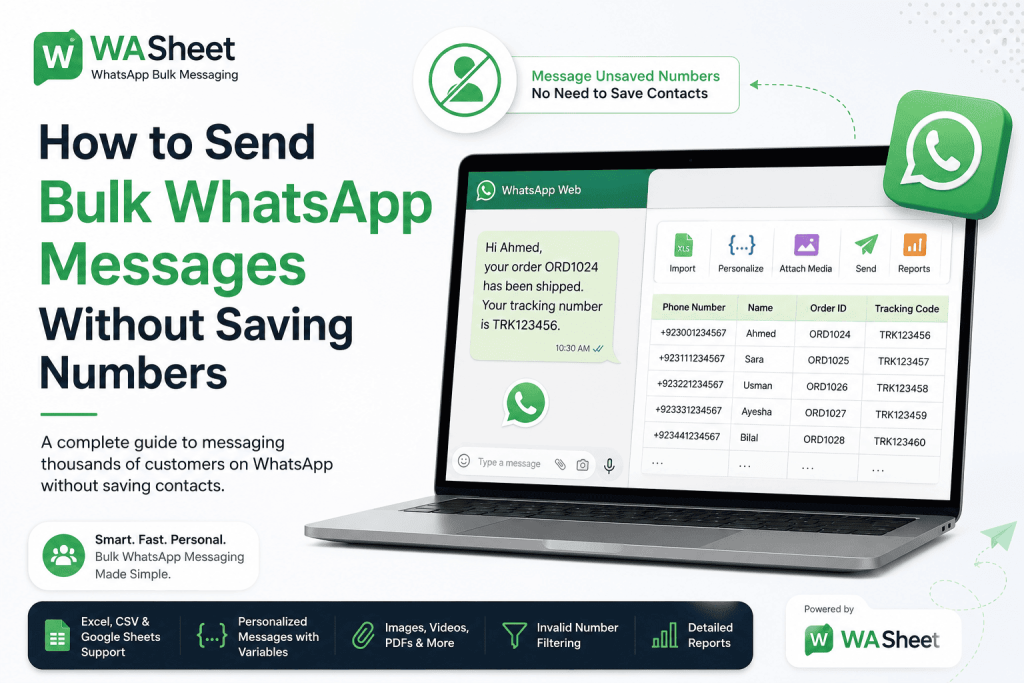
In this guide, we’ll explain how to send bulk WhatsApp messages without saving numbers or contacts works, how to organize your recipient list, how to personalize messages at scale, and how tools such as WASheet can help simplify the process through WhatsApp Web.
WhatsApp has become one of the most effective channels for businesses to communicate with customers, leads, and clients. From promotional campaigns and product launches to order updates and appointment reminders, businesses can reach their audiences where they already spend their time.
Whether you call it messaging an unsaved number or sending bulk WhatsApp messages free without adding a contact, the method is the same you don’t need to save anyone to your phonebook first.
But there is one problem that quickly becomes frustrating: you don’t want to save every phone number to your contacts just to send a WhatsApp message.
If you’re messaging 50, 100, or even thousands of recipients, manually adding each number is slow, unnecessary, and can leave your phonebook filled with contacts you may never communicate with again.
The good news is that you can send WhatsApp messages without saving numbers and manage bulk messaging more efficiently with the right workflow.
Quick answer: To send a bulk message on WhatsApp without saving a number, import your contact list from Excel, CSV, or Google Sheets into a tool like WASheet, write one message template with personalization fields (name, order ID, etc.), and send WhatsApp Web opens each chat by phone number, so nothing needs to be saved to your address book first.

Key Takeaways
- You can send WhatsApp messages to unsaved numbers without adding every recipient to your address book.
- Bulk WhatsApp messaging can save significant time for businesses handling large contact lists.
- Google Sheets, Excel, and CSV files can make recipient management much easier.
- Personalized messages are more useful than generic copy-and-paste broadcasts.
- Images, videos, audio, and documents can make business communication more informative and engaging.
- Sending messages responsibly requires attention to consent, relevance, frequency, and WhatsApp’s policies.
- WASheet can help businesses manage bulk WhatsApp campaigns, templates, personalization, media, and contact lists through WhatsApp Web.
What Does Bulk WhatsApp Messaging Without Saving Numbers Mean?
Bulk WhatsApp messaging without saving numbers means sending messages to multiple WhatsApp users without first adding every phone number to your phone’s contact list.
This is particularly useful when you have a temporary or campaign-specific list of recipients.
For example, you might have a spreadsheet containing:
- Customer phone numbers
- Customer names
- Order IDs
- Appointment dates
- Tracking numbers
- Product names
- Custom messages
Instead of manually creating a contact for every person, you can organize the information in a spreadsheet and use a bulk WhatsApp messaging workflow to reach your intended recipients.
This approach is useful for businesses that regularly communicate with:
- New leads
- Online shoppers
- Event attendees
- Webinar registrants
- Appointment customers
- Delivery recipients
- Real estate prospects
- Students and course participants
- Existing customers
- Sales inquiries
The key benefit is simple: your contact list stays clean while your business communication remains organized.
Why Send WhatsApp Messages Without Saving Contacts?
Saving every number isn’t always practical. In many business situations, you only need to communicate with someone once or for a short period.
Here are some of the biggest advantages of messaging unsaved WhatsApp numbers.
1. Save Hours of Manual Work
Adding contacts one by one can become a major bottleneck when you’re managing a large campaign.
Imagine receiving a spreadsheet with 500 customer numbers. Saving each number individually before sending a message adds unnecessary work to an already time-consuming process.
A structured bulk messaging workflow lets you focus on the message itself rather than spending hours managing your address book.
2. Keep Your Personal Contacts Organized
Your phone’s contact list isn’t necessarily a CRM.
If you save every lead, customer, delivery recipient, or one-time inquiry, your address book can quickly become difficult to manage.
Sending messages to unsaved numbers helps separate temporary communication lists from your long-term contacts.
For businesses, this can make contact management much cleaner.
3. Manage Campaigns from a Spreadsheet
Many businesses already store customer information in Excel or Google Sheets.
Instead of moving information between multiple systems, you can use your spreadsheet as the source for your messaging campaign.
Depending on your workflow, a spreadsheet might contain:
| Phone Number | Name | Order ID | Product | Delivery Date |
|---|---|---|---|---|
| phone-Number | Anand | ORD1024 | Shoes | July 25 |
| phone-Number | Sonia | ORD1025 | Bag | July 26 |
This information can then be used to create personalized WhatsApp messages at scale.
How to Send Bulk WhatsApp Messages Without Saving Numbers
There are several ways to approach WhatsApp bulk messaging, depending on your business requirements and the size of your campaign.
For businesses working with WhatsApp Web and spreadsheet-based contact lists, tools such as WASheet can simplify the process.
WASheet supports bulk messaging workflows using sources such as Excel, CSV, and Google Sheets, along with message templates, personalization variables, and multimedia attachments.
Here’s a practical workflow.
Step 1: Prepare Your Recipient List
Start by organizing your contacts in Excel, CSV, or Google Sheets.
At a minimum, include a phone number column.
For personalized campaigns, you can also include fields such as:
- Name
- Order ID
- Product
- Amount
- Appointment date
- Delivery date
- Tracking number
- Custom message
Make sure phone numbers are stored consistently using the correct international country code.
For example:
Correct: +phone-number
Avoid inconsistent formatting such as unnecessary spaces, dashes, or missing country codes.
Before launching a campaign, review your data carefully. Incorrect or incomplete numbers can result in failed messages and wasted campaign effort.
Step 2: Connect Your Messaging Workflow
If you’re using WASheet, the process works through WhatsApp Web. The current tool supports importing contact data from Excel, CSV, and Google Sheets, allowing businesses to work with lists they already maintain.
A typical workflow is:
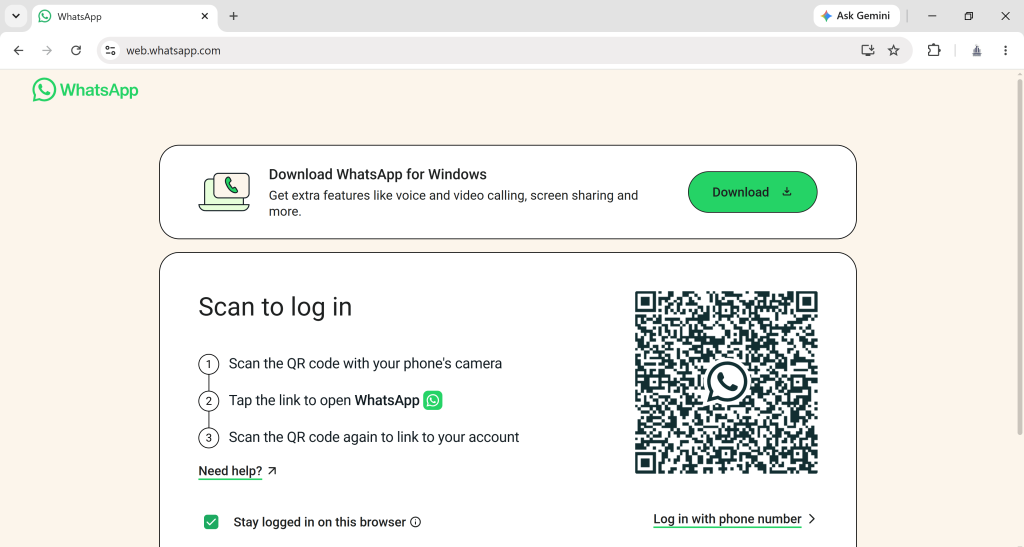
- Install and open WASheet.
- Login WhatsApp Web in a supported browser.
- Import your spreadsheet or contact list.
- Select or create a message template.
- Map your personalization fields.
- Add media if required.
- Review the campaign.
- Start sending your messages.
The exact interface and available options may change as the product evolves, so it’s best to check the latest WASheet documentation before starting a campaign.
Send a Bulk Message on WhatsApp Without Saving the Number
To send a bulk message on WhatsApp without saving the number, just import your recipient list into WASheet and let it open each WhatsApp Web chat by phone number directly no manual contact-saving step required, even across hundreds of recipients.
Step 3: Create a Personalized WhatsApp Message
One of the biggest advantages of using a spreadsheet-driven messaging workflow is personalization.
Instead of sending:
Hello, your order has been confirmed.
You can send:
Hi {name}, your order {order_id} has been confirmed. Your {product} is scheduled for delivery on {delivery_date}.
A personalized message feels more relevant because it provides information specific to the recipient.
Depending on your data, you can personalize messages with:
- Customer name
- Order number
- Product name
- Appointment time
- Delivery date
- Tracking code
- Payment amount
- Booking details
For example:
Hi {cust name}, your appointment with {business_name} is confirmed for {date} at {time}. If you need to reschedule, please contact us.
This type of messaging is particularly useful for customer service, ecommerce, appointment management, and transactional communication.
WASheet currently supports custom variables in message templates and can use spreadsheet data to personalize messages.
Step 4: Add Images, PDFs, Videos, or Other Files
Text isn’t always enough.
Depending on the campaign, you may want to send a relevant attachment with your WhatsApp message.
Examples include:
- Product images
- Promotional flyers
- PDF invoices
- Receipts
- Brochures
- Catalogs
- Short product videos
- Quotes
- Booking documents
WASheet’s current feature set supports multimedia attachments, including images, videos, audio, and documents, making it possible to combine personalized text with supporting content.
The important word here is relevant.
Don’t attach large or unnecessary files simply because the option is available. The best WhatsApp campaigns are useful, concise, and easy for recipients to understand.
Step 5: Review Your Campaign Before Sending
Before starting a bulk WhatsApp campaign, take a moment to review your data.
Check:
- Are the phone numbers correctly formatted?
- Are country codes included?
- Are all personalization variables mapped correctly?
- Are names spelled correctly?
- Are order numbers accurate?
- Are dates and times correct?
- Are media files working?
- Is the message clear?
- Does the message include the right call to action?
A single incorrect variable can turn a professional campaign into an embarrassing one.
For example, you don’t want customers receiving:
Hi {client name}, your order {prod order_id} is ready.
Instead, they should receive something like:
Hi Anand, your order ORD1024 is ready.
Always test your message format before sending it to a large audience.
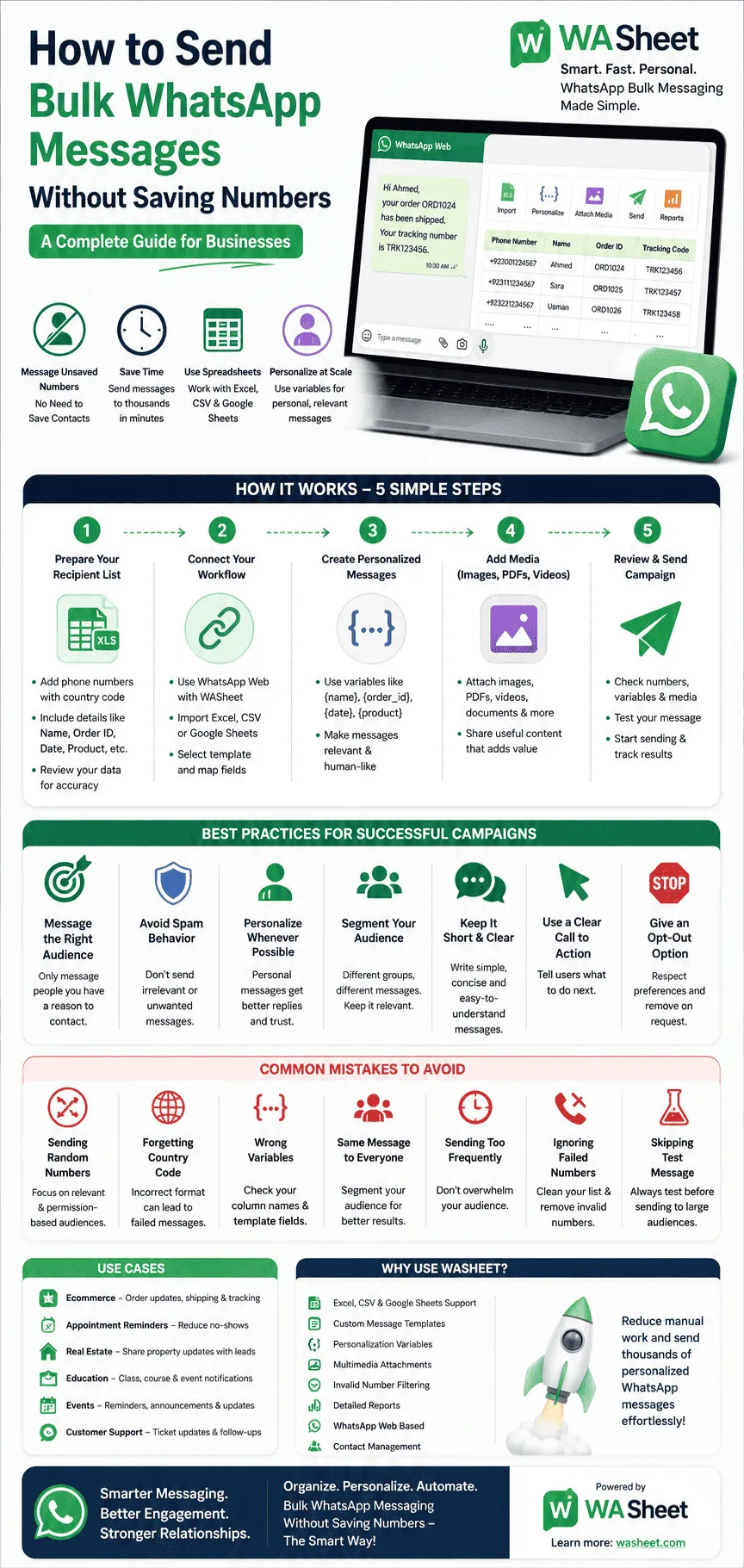
Best Practices for Bulk WhatsApp Messaging
Sending messages at scale isn’t simply about reaching as many people as possible.
The goal is to send relevant messages to the right audience at the right time.
Here are the practices that can make your campaigns more effective and responsible.
1. Only Message People You Have a Reason to Contact
The quality of your recipient list matters more than its size.
Avoid building campaigns around random phone numbers or people who have no relationship with your business.
Instead, focus on audiences such as:
- Existing customers
- People who requested information
- Leads who contacted your business
- Customers who opted into updates
- Event registrants
- People who requested reminders
- Users who expect order or delivery notifications
Permission and relevance are essential for sustainable WhatsApp communication.
2. Don’t Treat WhatsApp Like a Spam Channel
Bulk messaging doesn’t mean sending the same promotional message to everyone you can find.
If recipients repeatedly receive unwanted messages, they may ignore, block, or report your account.
Instead:
- Segment your audience.
- Keep messages relevant.
- Avoid excessive frequency.
- Respect opt-out requests.
- Don’t repeatedly contact people who don’t engage.
- Follow applicable WhatsApp and business messaging policies.
No third-party tool can guarantee that an account will never be restricted. Your messaging behavior, recipient feedback, and compliance with WhatsApp’s rules still matter.
3. Personalize Whenever Possible
Personalization can make a bulk campaign feel much more like a one-to-one conversation.
Compare these two messages:
Generic:
We have a new offer. Check it out!
Personalized:
Hi Ahmed, the running shoes you viewed are now available with our latest offer. Would you like me to send you the details?
The second message is more contextual and gives the recipient a reason to engage.
Use personalization fields naturally. Don’t overload every message with unnecessary customer data.
4. Segment Your Audience
One of the biggest mistakes in bulk WhatsApp marketing is treating every customer the same.
Your audience might include:
- New leads
- Existing customers
- Repeat buyers
- High-value customers
- Inactive customers
- Customers waiting for delivery
- People who requested a quote
Each group may need a different message.
For example, a new lead might receive:
Hi {clientele name}, thanks for contacting us. Would you like more information about our services?
A returning customer might receive:
Hi {name}, welcome back! We’ve added new products that may interest you.
Segmentation improves relevance and can help reduce unnecessary messages.
5. Keep Your Message Short and Clear
WhatsApp is conversational.
Your recipients shouldn’t have to read a long essay to understand why you’re contacting them.
A good business message usually includes:
- A personalized greeting
- A clear reason for contacting them
- The important information
- A simple call to action
For example:
Hi {recipeint name}, your appointment is confirmed for {date} at {time}. If you need to change the appointment, reply to this message and we’ll help you.
Simple. Useful. Easy to understand.
6. Use a Clear Call to Action
Every campaign should have a purpose.
Do you want the recipient to:
- Reply to your message?
- Visit your website?
- Confirm an appointment?
- Track an order?
- Request a quote?
- View a product?
- Contact your support team?
Tell them what to do next.
For example:
Reply “YES” to confirm your appointment.
Or:
Reply to this message if you’d like to see the available options.
A clear call to action can make your messaging more effective than a vague promotional announcement.
7. Give People a Way to Opt Out
If you’re sending recurring promotional or marketing messages, make it easy for people to stop receiving them.
You might say:
If you no longer want to receive promotional updates, reply STOP.
The exact wording should fit your business and applicable requirements.
The important principle is simple: respect people’s communication preferences.
If someone asks not to be contacted again, remove them from future campaigns.
Common Bulk WhatsApp Messaging Mistakes
Even with a good messaging tool, poor campaign management can lead to bad results.
Here are some common mistakes to avoid.
Mistake #1: Sending Messages to Random Numbers
A large list isn’t automatically a valuable list.
Focus on relevant audiences and permission-based communication.
Mistake #2: Forgetting the Country Code
International phone numbers should be consistently formatted.
Review your spreadsheet before sending.
Mistake #3: Using the Wrong Personalization Variable
If your spreadsheet has a Customer Name column but your template expects {name}, the personalization may not work correctly.
Keep your column names and variables consistent.
Mistake #4: Sending the Same Message to Everyone
A message designed for new leads may not make sense for existing customers.
Segment your audience before launching a campaign.
Mistake #5: Sending Too Frequently
Even valuable messages become annoying when they arrive too often.
Build a reasonable communication schedule.
Mistake #6: Ignoring Failed Numbers
Invalid or inactive numbers can waste time and resources.
WASheet currently offers invalid-number filtering and reporting features that can help users identify failed or skipped contacts.
Mistake #7: Skipping the Test Message
Always test your campaign first.
Check the final message exactly as a recipient would see it.
Bulk WhatsApp Messaging Use Cases
The ability to message unsaved numbers can be useful across many industries.
Ecommerce
Online stores can use WhatsApp to communicate order-related information, product updates, and customer support messages.
Example:
Hi {buyer name}, your order #{order_id} has been shipped. Your tracking number is {tracking_code}.
Appointment Reminders
Clinics, salons, consultants, and service businesses can send reminders without manually saving every customer’s number.
Example:
Hi {customer name}, this is a reminder that your appointment is scheduled for {date} at {time}.
Real Estate
Real estate professionals can communicate with leads and prospects using personalized messages.
Example:
Hi {lead name}, a new property matching your requirements is now available in {location}. Would you like me to send you the details?
Education and Training
Schools, tutors, and training providers can send reminders and updates to students.
Possible use cases include:
- Class reminders
- Enrollment updates
- Event notifications
- Course information
- Webinar reminders
Events
Event organizers can use WhatsApp to communicate important information to registered attendees.
Examples include:
- Event reminders
- Venue details
- Schedule updates
- Registration confirmations
- Last-minute announcements
Customer Support
Businesses can use personalized WhatsApp messages to provide updates throughout the customer journey.
For example:
- Ticket updates
- Service notifications
- Delivery information
- Follow-up messages
- Feedback requests
Why Use WASheet for Bulk WhatsApp Messaging?
For businesses that already manage customer information in spreadsheets, WASheet can help bring contact data and WhatsApp communication into one workflow.
Its current features include support for:
- Excel files
- CSV files
- Google Sheets
- Custom message templates
- Personalization variables
- Multimedia attachments
- Invalid-number filtering
- Message reports
- WhatsApp Web-based workflows
- Contact management features
These capabilities can be particularly useful for small businesses, ecommerce stores, agencies, sales teams, customer support teams, and other organizations that rely heavily on WhatsApp communication.
The biggest advantage is the reduction in repetitive manual work.
Instead of repeatedly copying a phone number, opening a chat, typing a message, and repeating the same process, businesses can organize campaign data in a structured format and use templates to streamline communication.
How to Create a Better WhatsApp Bulk Messaging Strategy
A successful campaign isn’t just about the software you use.
The most effective approach combines good data, useful messaging, personalization, segmentation, and responsible sending practices.
A simple framework is:
- Build a quality audience: Know who you’re contacting and why.
- Organize your data: Keep phone numbers and customer information accurate.
- Segment your recipients: Create separate groups based on customer type, interests, or communication needs.
- Personalize the message: Use relevant information instead of generic copy.
- Keep the message useful: Give recipients a clear reason to read and respond.
- Test before sending: Check your variables, formatting, links, and attachments.
- Monitor results: Review delivery and response data where available.
- Improve future campaigns: Use what you learn to make your next campaign more relevant.
This approach turns bulk WhatsApp messaging from a simple broadcasting activity into a more thoughtful customer communication strategy.
Frequently Asked Questions
Can I send a WhatsApp message to an unsaved number?
Yes. WhatsApp lets you open a chat with any phone number using a direct chat link, without adding that number to your contacts first. Tools like WASheet extend this to bulk campaigns, letting you message unsaved numbers from a spreadsheet instead of one at a time.
How do I send a bulk WhatsApp message without adding a contact?
Upload your recipient list (Excel, CSV, or Google Sheets) into WASheet, create a message template, and send each message goes out through WhatsApp Web without requiring you to save any number as a contact.
What’s the difference between sending to a saved contact and an unsaved number on WhatsApp?
None from the recipient’s side they receive the message the same way either time. The only difference is on your end: an unsaved number won’t show a name or sit in your address book afterward.
Can I send WhatsApp messages without saving numbers?
Yes. You don’t necessarily need to save every recipient as a contact before messaging them. The exact method depends on the tool and workflow you use. Tools such as WASheet are designed to help businesses send messages to unsaved numbers through WhatsApp Web.
Can I send bulk WhatsApp messages using Excel, CSV, or Google Sheet?
Yes. WASheet currently supports Excel, Google Sheets and CSV files as part of its bulk messaging workflow. You can organize phone numbers and customer information in a spreadsheet and use that data for messaging and personalization.
Can I personalize bulk WhatsApp messages?
Yes. With template variables, you can personalize messages using information such as a customer’s name, order ID, delivery date, or other fields in your data.
Can I send images and PDFs with WhatsApp messages?
Yes. WASheet currently supports multimedia attachments, including images, videos, audio, and documents. This can be useful for sending product information, invoices, brochures, catalogs, and other relevant files.
Will WhatsApp ban me for sending bulk messages?
There is no tool that can guarantee your account will never be restricted. WhatsApp users should follow applicable policies and avoid spammy or unwanted messaging behavior.
Sending messages to people who don’t expect them, receiving frequent blocks or reports, and repeatedly sending irrelevant content can create account risks.
The safest approach is to communicate with relevant audiences, respect opt-out requests, keep campaigns targeted, and follow WhatsApp’s current rules.
Is WASheet free?
WASheet’s offers free usage or monthly credits, with paid plans available for users who need additional capacity or premium features. Check the current WASheet pricing information for the latest plan details.
Do I need coding skills?
No. WASheet is designed as a browser-based Chrome extension and is intended to work without requiring users to write code.
Final Thoughts: A Smarter Way to Send WhatsApp Messages Without Saving Numbers
If your business regularly communicates with customers, leads, or one-time recipients, manually saving every phone number can quickly become a frustrating and unnecessary task.
A better approach is to organize your audience in a structured spreadsheet, personalize your messages, segment your recipients, and use a suitable WhatsApp messaging workflow.
For businesses that work with Excel, CSV, or Google Sheets, tools such as WASheet can simplify bulk WhatsApp messaging through WhatsApp Web while supporting features such as message templates, personalization, multimedia attachments, and contact management.
But remember effective WhatsApp marketing isn’t about sending the largest number of messages possible.
It’s about sending relevant messages to the right people at the right time.
When you combine clean data, personalization, useful content, responsible sending practices, and a clear communication strategy, you can save time while creating a better experience for the people you’re trying to reach.
Ready to streamline your WhatsApp communication? Explore WASheet and see how spreadsheet-based bulk messaging can fit into your business workflow.